Blog

  • Montserrat: The Typeface That Turned a Neighborhood Into a Global Standard

    Montserrat: The Typeface That Turned a Neighborhood Into a Global Standard

    Every famous typeface has an origin story, but few are as romantic as Montserrat’s. It was not commissioned by a corporation, drawn at a centuries-old foundry or designed as the house face of a magazine. It began with a young Argentine graphic designer walking through a historic Buenos Aires neighborhood, looking at century-old commercial signage, and deciding that those forgotten letterforms deserved a new life — for free, for everyone. A decade later, that gesture of typographic love produced one of the most downloaded typefaces on the planet. This review looks at Montserrat’s unusual birth, its design strengths, its genuine limitations, and how to use it without falling into its most common traps.

    Origins: A Kickstarter in Buenos Aires

    Montserrat is the work of Julieta Ulanovsky, an Argentine type designer, and it is named after the Montserrat neighborhood of Buenos Aires, where she lived and worked. The district’s streets are lined with buildings from the early twentieth century, when waves of European immigrants brought with them the geometric, modern sensibilities of urban signage. Business signs, posters and painted lettering from that era used bold, rational, geometric letterforms — a Latin American cousin of the same modernist spirit that produced Futura in Germany.

    Ulanovsky began drawing a typeface to honor that vernacular heritage. To fund the work, she turned to Kickstarter in 2010–2011 — one of the first typefaces ever crowdfunded — and the campaign succeeded. The result was released under the SIL Open Font License and appeared on Google Fonts, where it cost nothing to use and was one click away from every web designer on Earth.
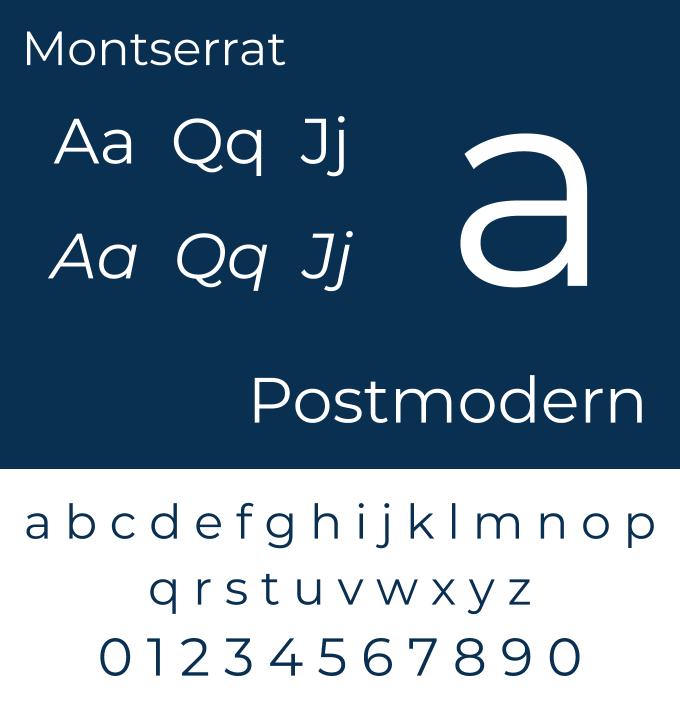
    Montserrat specimen card with roman and italic letterforms
    Montserrat: roman and italic specimen. Image by Baron Maddock, CC BY-SA 4.0, via Wikimedia Commons

    The family grew in ambitious stages. An expanded release added a full nine-weight range from Thin to Black, with matching italics, developed with collaborators including Jacques Le Bailly and Juan Pablo del Peral. Companion families followed: Montserrat Alternates, offering a set of distinctive alternate letterforms, and Montserrat Subrayada (“subrayada” is Spanish for “underlined”), an eccentric display variant whose letters carry permanently attached underlines. All of it remains free.
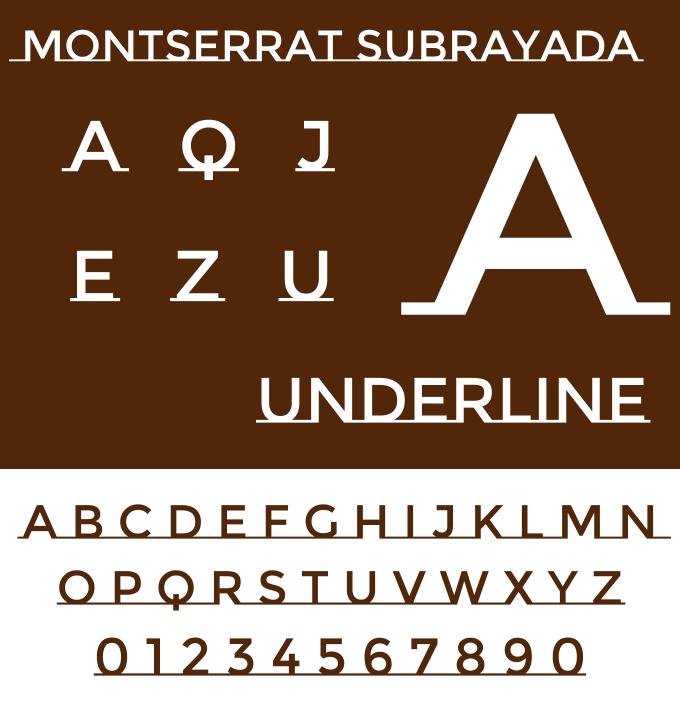
    Montserrat Subrayada, the underlined display variant
    Montserrat Subrayada, whose letters carry permanently attached underlines. Image by Baron Maddock, CC BY-SA 4.0, via Wikimedia Commons

    The Design: Geometric, Friendly and Practical

    The geometry, softened

    At its core, Montserrat belongs to the geometric sans-serif tradition that Futura founded: a circular o, even monolinear strokes, clean geometric bones. But here is the first thing a careful eye will notice, and the design’s most important decision. Montserrat’s a is double-story, unlike Futura’s schoolbook circle-with-a-stem. This is a deliberate choice with deep practical consequences. The geometric skeleton gives the face its clean, even rhythm, while the conventional two-story a and other humanist touches make it substantially more comfortable to read than its 1920s ancestors. Montserrat is, in effect, a negotiation between Futura’s geometry and the readability of a modern workhorse sans.

    Other signatures:

    • A large x-height with compact ascenders, giving it a solid, contemporary texture at both display and text sizes — the opposite strategy from Futura’s dramatic long legs.
    • Wide, open proportions. Montserrat runs noticeably wide; its capitals are broad and confident, which is a large part of why it looks so good in logos, headlines and navigation bars.
    • Even, monolinear strokes with slightly rounded terminals that soften the geometry without making it cute.
    • A genuinely complete family. Nine weights with true italics, from hairline Thin to poster-ready Black, plus tabular figures and broad language support — a technical depth that many free fonts never achieve.

    The city in the letters

    What separates Montserrat from its geometric rivals is a certain warmth that resists analysis. The letterforms carry traces of their painted, hand-scaled ancestors — a generosity in the curves, a confidence in the spacing — that keeps the face from feeling sterile. It looks modern without looking cold, which is exactly the balance most brands want and few fonts deliver.

    Montserrat in the Wild

    Once on Google Fonts, Montserrat’s rise was rapid and enormous. It has spent years among the most-served families on the platform, in the company of Roboto, Open Sans and Inter — and it reached that position not through a default slot (unlike those system-backed faces) but through choice, one project at a time.

    You will find it everywhere independent design lives: startup landing pages, restaurant branding, city and cultural-festival identities, conference materials, YouTube thumbnails, app interfaces, wedding stationery and a substantial share of the world’s pitch decks. Its uniform caps and geometric bones make it a favorite for logotypes that need to feel established without paying for a custom font. In the public sector, Latin American institutions and cities have used it with particular affection — a homegrown success story returning to serve the region that inspired it.

    The pattern is telling: Montserrat became the “free Futura” for a generation of designers who wanted geometric confidence without licensing negotiations — and then, somewhere along the way, simply became the default ambient typography of the 2020s web.

    The Weak Spots

    Ubiquity fatigue is real. Montserrat’s greatest strength, free availability, has produced genuine overexposure. Because it is the single most convenient geometric sans, it is chosen by default far more often than by intent, and design forums now treat “just use Montserrat” the way earlier generations treated “just use Helvetica.” If distinctiveness matters, think twice.

    Wide means costly. The generous proportions that flatter headlines also consume space. Long paragraphs of body text set in Montserrat eat horizontal real estate and can feel loose and slightly clumsy; the face is stronger in short bursts than in continuous reading.

    Personality sits in the middle. Montserrat is friendly-neutral. It has none of Futura’s drama, none of Avenir’s elegance, none of Inter’s engineering precision. In creative or luxury contexts it can read as generic-pleasant.

    The alternate universe problem. Between the main family, Alternates, Subrayada and the many weights, it is easy to mix stylistic registers unintentionally. The Alternates letterforms are charming but distinctly flavored; sprinkling them into a body of standard Montserrat produces visual noise.

    Practical Tips for Using Montserrat

    1. Use it as a display and UI face, not a body face. Headlines, buttons, navigation, signage and logos are where its width and confidence pay off. For long-form reading, pair it with a dedicated text face.

    2. Exploit the weight range. Light and Thin weights look excellent at large sizes; Medium and SemiBold are the workhorses for interfaces; Bold and Black shine in posters. Avoid using Black at small sizes.

    3. Tighten tracking in headlines. Like most geometric sans-serifs, Montserrat benefits from slightly negative letterspacing at large sizes.

    4. Use Montserrat Alternates deliberately. Treat the alternates as a separate display voice — a logo, a wordmark, a title sequence — rather than an inline variation.

    5. Pair it with contrast. Montserrat + a warm serif (Lora, Source Serif) is a reliable editorial combination; Montserrat + a mono (JetBrains Mono) suits tech products. Avoid pairing it with another geometric sans — they fight over the same territory.

    The Alternatives

    • Futura — the historic original; more radical, more elegant, and dramatically worse at small sizes.
    • Avenir / Nunito Sans — the humanist-geometric middle ground; Avenir is the paid gold standard of warmth.
    • Poppins — a purer geometric with perfect circles and monolinear strokes; friendlier but less practical for text.
    • Raleway — more elegant and display-oriented, with a distinctive w; a close neighbor on Google Fonts.
    • Jost, Manrope, Figtree — further free geometric-adjacent options, each leaning more experimental or more neutral.

    Verdict

    Montserrat is proof that the typographic commons can produce world-class work. A neighborhood’s forgotten signage, rescued by a designer with a Kickstarter campaign and given away under an open license, became one of the defining typefaces of the free web — complete, well-made, versatile and generous. Its flaws are the standard tax of popularity: ubiquity, mild blandness in long text, and a width that wants to be in charge.

    Use it when you need geometric confidence, a complete free family and zero licensing friction — and when being the only one in the room is not the goal. It will not give your brand a private voice, but it will give it a clear, friendly and modern one, almost for free.

    Rating: 8.5/10 — the people’s geometric sans: superb craft and complete freedom, docked half a point only because everyone else already knows that too.
  • Bodoni: The Typeface That Turned Type Into Architecture

    Bodoni: The Typeface That Turned Type Into Architecture

    At the end of the eighteenth century, as Europe rebuilt itself in marble and mathematics, typography went through the same transformation. The rounded, handwritten warmth of the Renaissance gave way to something colder, sharper and thrillingly modern. Its name was Bodoni. For over two hundred years this face has been the signature of luxury fashion, avant-garde poetry and editorial drama — the typeface of Vogue, of Playbill, of countless minimalist posters. It is also, famously, one of the most misused typefaces in the world. This review traces the life of Giambattista Bodoni, dissects the design that made type look like architecture, and explains how to handle a face that punishes carelessness more than almost any other.

    Origins: The Printer Who Outlived Every Fashion

    Giambattista Bodoni (1740–1813) was born in Saluzzo, in the Piedmont region of Italy, the son of a printer, and died as the most celebrated printer in Europe. His career traced the Enlightenment itself: after an early stint at the Congregation for the Propagation of the Faith in Rome — where he cut type and argued with his superiors — he took charge of the ducal press in Parma in 1768, under Duke Ferdinand of Bourbon-Parma.

    Parma gave Bodoni what few printers ever had: money, time and the freedom to pursue perfection for its own sake. Over four decades he printed lavishly illustrated editions of the classics in Greek, Latin, Hebrew, Russian, Arabic and dozens of other scripts, and his fame grew until he was receiving orders from royalty and the newly arrived Napoleon, who granted him a pension. When his masterwork, the Manuale Tipografico — a two-volume specimen of his types — appeared after his death, it was greeted as a monument.

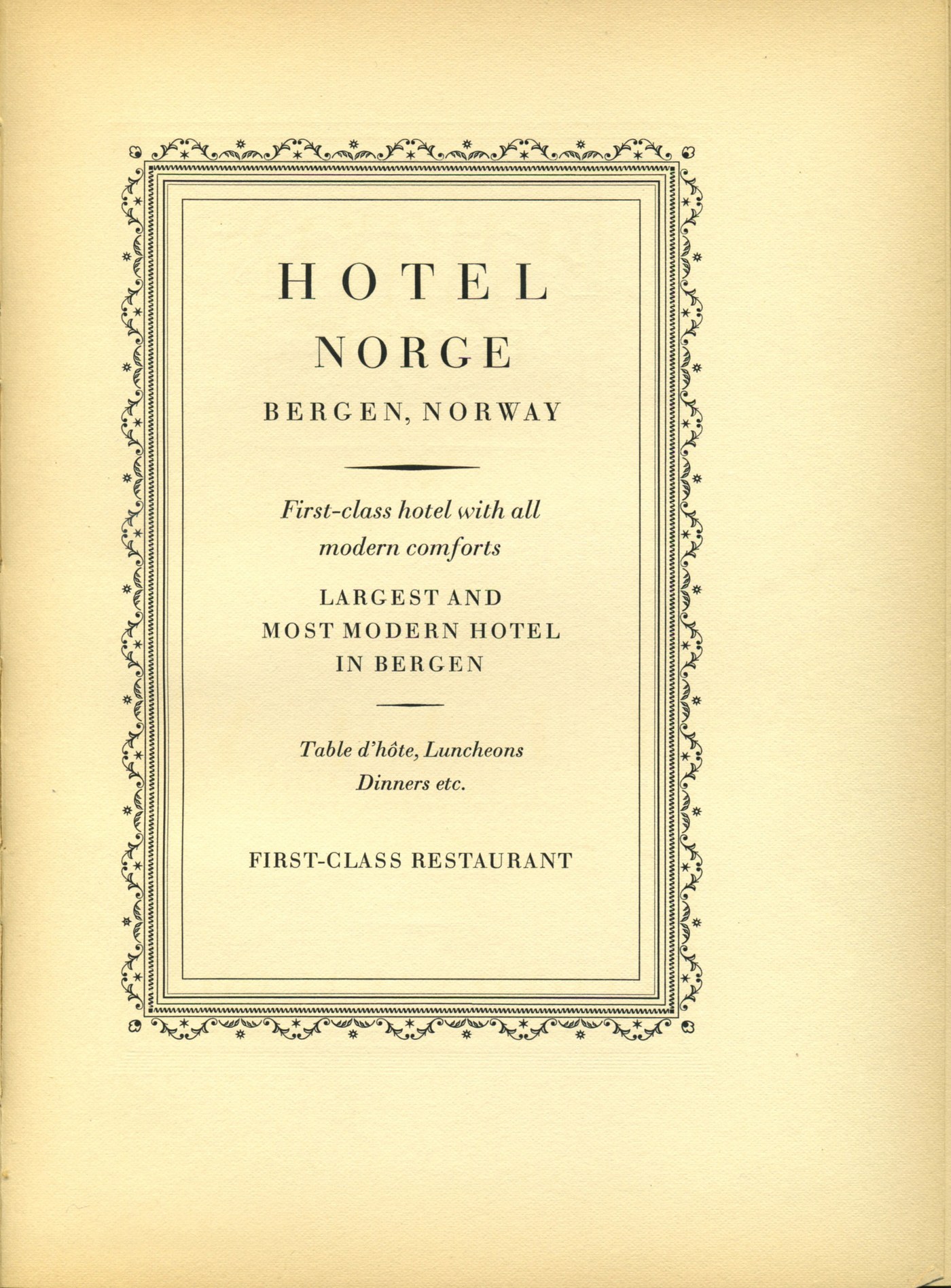
    Hotel Norge advertisement page printed in Bodoni
    An advertisement page printed in Bodoni, from a Bauer Bodoni specimen. Photo: James Puckett, CC BY 2.0, via Wikimedia Commons

    What Bodoni did to letterforms was genuinely revolutionary. Working in parallel with the French Didot family (and influenced by Baskerville’s earlier experiments), he abandoned the last pretense that type should imitate the broad-nib pen. Instead he built letters from geometry: hairline strokes, ball terminals, perfectly vertical stress. Type stopped looking like writing and started looking like engineering — a face for the age of the machine, decades before the machines arrived.

    The Design: Extreme Contrast as a System

    Hairlines, ball terminals, verticality

    Bodoni is the leading member of the Didone class, and its defining trait is contrast taken to its logical extreme. Thick strokes are nearly slab-like; thin strokes are hairlines almost fine enough to sever. The stress of each letter is strictly vertical, the serifs are thin, flat and unbracketed — attached like crossbeams rather than grown like calligraphy — and curves end in expressive ball terminals. The lowercase a, the c and the g are the standard teaching examples: circles and columns rather than gestures.

    The effect at large sizes is breathtaking. Bodoni headlines have a tension no other classic face achieves: elegant and severe at once, decorative and austere. This is why fashion houses adopted it almost reflexively — the typeface draws a straight line between modern engineering and aristocratic taste.

    The price of hairlines

    The same hairlines that make Bodoni’s display sizes dazzling destroy it in the wrong conditions. Fine strokes need perfect printing: smooth paper, crisp impression, clean reproduction. On cheap paper or a low-resolution screen, hairlines break up or vanish, and the text dissolves into fragments. Bodoni was never, in its pure form, intended for long body text — it is a display and short-text face by physics as much as by intent. (This did not stop nineteenth-century printers from setting entire books in it, and suffering for it.)

    Bodoni in the Wild

    Fashion discovered Bodoni early and never let go. Vogue’s iconic masthead has carried variants of Bodoni since the magazine’s modernization in the early twentieth century; Harper’s Bazaar followed the same route. Giorgio Armani, Valentino, Dolce & Gabbana and dozens of luxury brands have used it or its descendants. Broadway’s Playbill has printed its name in Bodoni-derivative lettering since the 1880s — possibly the longest continuous engagement of a typeface in show business.

    Bodoni also has a serious avant-garde résumé. In the 1920s, writers and designers of the European avant-garde loved its stark geometry, and it appears throughout classic Futurist and modernist typographic experiments — the face was modern before modernism existed.

    Like Garamond, “Bodoni” is less one design than a jurisdiction of them. The principal branches: Bodoni’s own press types (preserved in Parma); the Bauer Bodoni, cut in Germany and prized as the most faithful to Bodoni’s later ideas; Linotype and Monotype Bodoni, the Anglo-American workhorses; and the modern Bodoni Old Face and ITC Bodoni Seventytwo, which consciously recreate different stages of his career. Modern revivals such as Bodoni Moda (free on Google Fonts) have brought the face back to digital screens with optical sizes that finally solve its hairline problem.

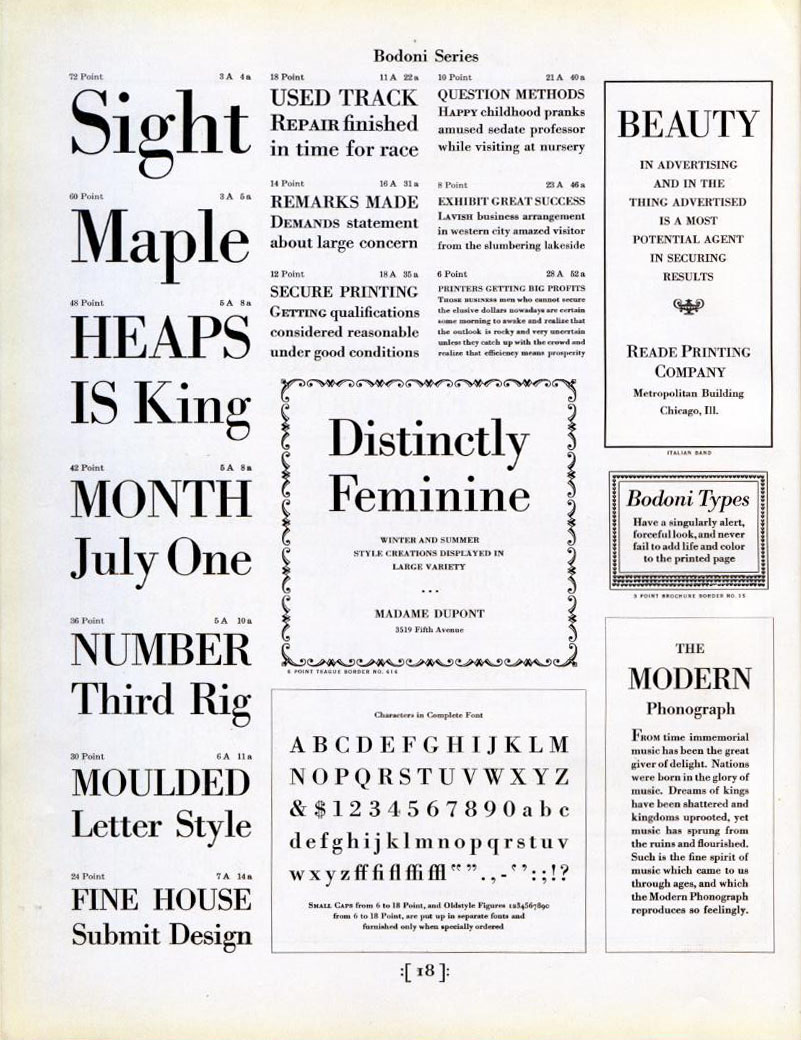
    Bodoni type specimen page with roman and italic
    A Bodoni type specimen page showing roman and italic styles. Photo: James Puckett, CC BY 2.0, via Wikimedia Commons

    The Weak Spots

    The screen was not kind. For decades, Bodoni on the web meant broken hairlines. Only with high-density displays and careful optical-size design (Bodoni Moda’s optical axis, or the masterfully engineered versions from foundries) has the face become truly usable online.

    It is terrible for long reading. The extreme contrast fatigues the eye; paragraph-length settings in classic Bodoni belong in museums. Use it for headlines, titles, pull quotes and short display text.

    It overpowers everything. Bodoni is a soloist. Set it next to another characterful face and the page turns into an argument. It demands quiet companions — or the courage to let it stand alone.

    Its coldness limits warmth. Bodoni communicates elegance, authority and drama; it does not do cozy. Food packaging for handmade jam, community newsletters and children’s brands will read as either pretentious or accidental irony.

    Practical Tips for Using Bodoni

    1. Match size to contrast. Reserve hairline-heavy cuts for large sizes; for anything smaller than about 16px, use a text-optimized optical size (Bodoni Moda’s lower optical sizes are designed exactly for this).

    2. Embrace the fashion instinct. Bodoni + restrained layout + generous whitespace equals instant editorial gravitas; Bodoni + clutter equals 1990s desktop publishing.

    3. Pair it with a quiet sans or a warm serif. For body text under a Bodoni headline, a humanist serif (or an unobtrusive sans like Inter) keeps the drama in the display line where it belongs.

    4. Watch the ball terminals in tight tracking. Bodoni’s round terminals collide when letters are squeezed; its elegance needs room to breathe.

    5. For free, go Bodoni Moda. It is the best open-source Didone, with a proper optical-size axis — an unusual and valuable feature even among commercial fonts.

    The Alternatives

    • Didot — the French rival: even finer hairlines, a more aristocratic attitude, and the typeface of Parisian fashion; harder to use, even more rewarding at display sizes.
    • Bodoni Moda — the accessible modern revival, free and optically sized.
    • Playfair Display — a free transitional-didone hybrid with sturdier hairlines; the practical choice for screens that need the drama without the fragility.
    • Bauer Bodoni — the connoisseur’s revival, prized for authenticity.
    • Walbaum — the gentler German cousin of the Didone class, warmer and more readable.

    Verdict

    Bodoni is typography’s opera: extreme, engineered, incapable of blending into the background, and magnificent when staged well. It ended the handwritten era of type and opened the geometric one, and its hairlines still define the visual vocabulary of luxury. Its fragility is not a flaw but a discipline — it simply refuses to be used carelessly, which may be the most Bodoni-like quality of all.

    For fashion, drama, cultural institutions and any design that wants to feel composed rather than written, Bodoni remains the sharpest tool in the drawer. Just never ask it to whisper for four hundred words at a time.

    Rating: 9/10 — the most dramatic classic serif ever cut; treat it like a grand piano, not a keyboard.

  • Baskerville: The Perfectionist’s Serif That Angered England

    Baskerville: The Perfectionist’s Serif That Angered England

    In the 1750s, an English industrialist named John Baskerville decided that English printing was sloppy, and set out to fix it with an obsession that bordered on madness. He invented new papers, new inks, new presses and, along the way, one of the most beautiful and influential typefaces in history. Printers of his era hated it; the famous rival type designer William Caslon reportedly refused even to look at it. A century later, typographers hailed it as a masterpiece. Today Baskerville sits in the sweet spot between the warmth of the Renaissance and the precision of the modern age — a face you have read thousands of times without ever catching it at work. This review covers its improbable origin story, its radical design, its digital afterlife, and how to use it well today.

    Origins: A Writing Master With No Training in Type

    The story of Baskerville begins with an unlikely hero. John Baskerville (1706–1775) was not a printer by trade but a master calligrapher and successful japanning manufacturer — a maker of lacquered ware in Birmingham — who had grown wealthy enough to pursue perfection as a hobby. When he turned to printing in the early 1750s, he did so with the eye of an outsider and the budget of an industrialist, and he rejected nearly everything the English print trade took for granted.

    His type was cut for him by John Handy, but to Baskerville’s own drawings and under his ruthless supervision. His paper was smoother and brighter than any made before, because he refined it himself. His ink was famously black because he ground and boiled it himself. His presses used heated metal platens to flatten the page evenly. He built, in effect, a complete printing system around the typeface, because he understood — decades before this became industry wisdom — that a letterform can only look as good as the paper, ink and pressure that carry it.

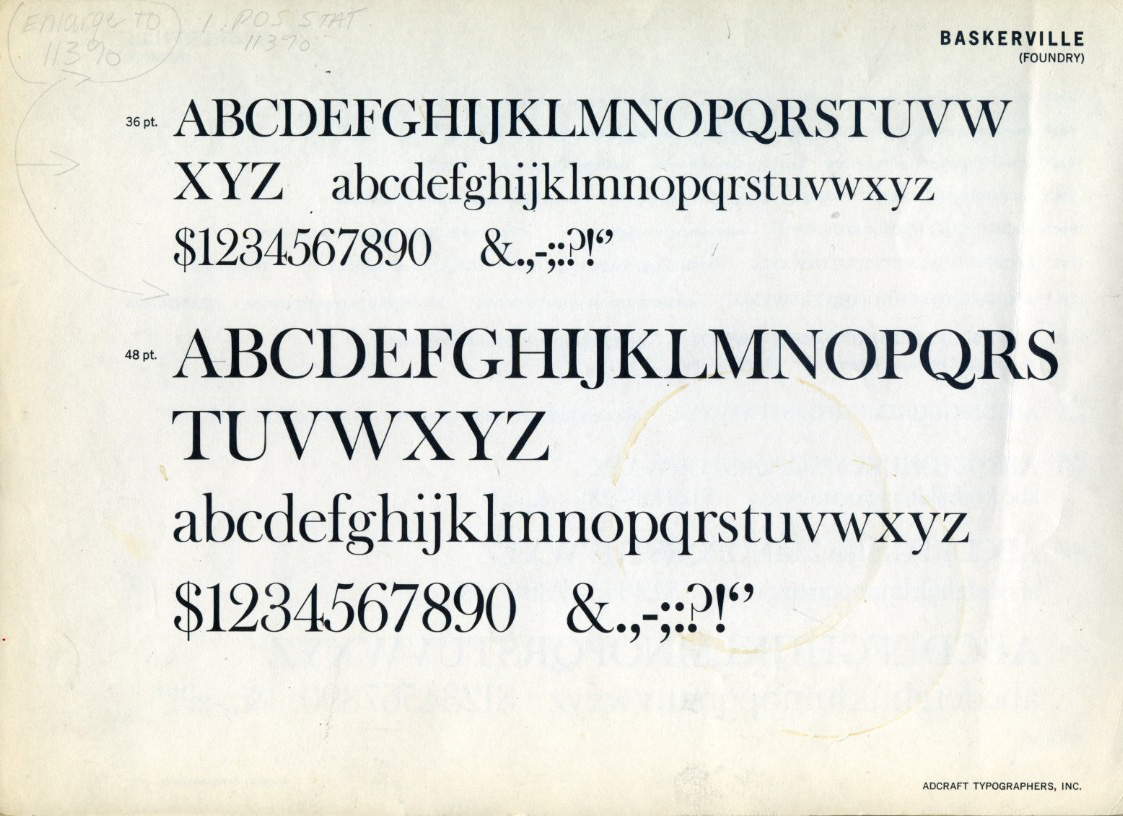
    Baskerville type specimen sheet at 36 and 48 point
    A Baskerville type specimen sheet showing the roman at 36 and 48 point. Photo: James Puckett, CC BY 2.0, via Wikimedia Commons

    The establishment’s reaction was hostile. English printers were loyal to William Caslon’s sturdy Old English faces, and Baskerville’s elegant, spare letters looked, to them, like an insult to tradition. Benjamin Franklin, a friend and admirer, told the story of a skeptic who dismissed the type as fit only for fine ladies; Franklin then showed him a piece of common printed matter that the man praised in ordinary terms — it was Baskerville’s type all along, revealed only when Franklin produced the proof.

    The Design: The Bridge Between Two Worlds

    What “transitional” means

    Typographers classify serifs into periods, and Baskerville is the textbook transitional face: it stands exactly halfway between the old-style serifs of the Renaissance (Garamond, Caslon) and the modern faces of the industrial age (Bodoni, Didot). You can see the transition in every part of the letter:

    • More contrast, still controlled. Thick and thin strokes differ more sharply than in Garamond, but without the hairline extremes of Bodoni.
    • Vertical stress. The axis of the letterforms has straightened from the pen-driven slant of the old style toward the engineered verticality of the moderns.
    • Finer, flatter serifs. Delicate and horizontal, pointing toward the austerity of Didone faces while retaining a bracketed softness.
    • Increased letter-spacing. Baskerville airily separates its letters — a deliberate, luxurious looseness that gave pages their celebrated sparkle on his brilliant white paper.

    The famous lowercase

    Baskerville’s lowercase g is one of typography’s showpieces — an elegant double-story form with a delicate lower loop. Its a, e and c are generous and round, the italic is genuinely written rather than slanted roman, and the overall texture is bright, open and civilized. In the 2000s, an experiment by the writer Errol Morris suggested something remarkable: people presented with a statement in Baskerville were measurably more likely to believe it than when the same text was set in other fonts. Whatever one thinks of the methodology, the anecdote captures the face’s reputation: Baskerville sounds trustworthy.

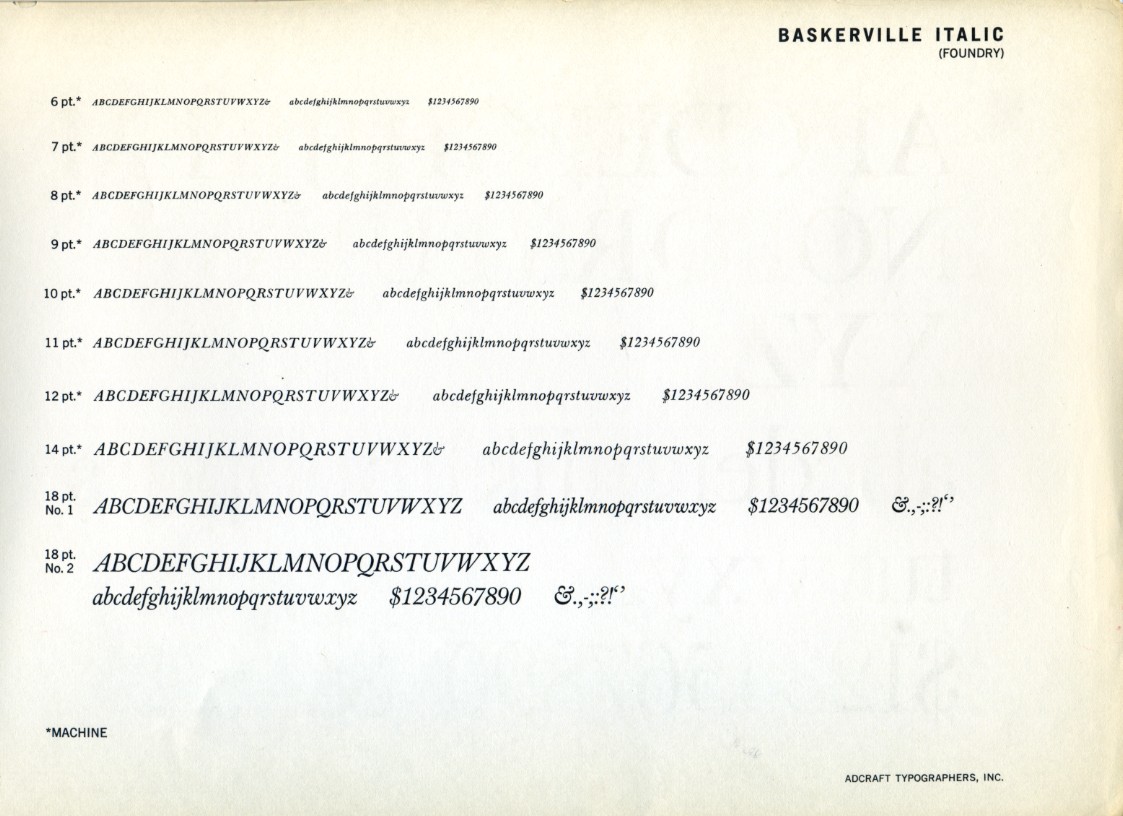
    Baskerville Italic type specimen
    Baskerville Italic — one of the loveliest italics in any serif family. Photo: James Puckett, CC BY 2.0, via Wikimedia Commons

    Decorations and the complete book

    Baskerville’s editions of Virgil, Milton and the Bible were as important as the type itself. His classically inspired ornaments and generous margins became a model for fine printing across Europe, directly influencing the Didots in France and Bodoni in Italy — the names that would complete the typographic revolution he started.

    Baskerville in the Wild

    After John Baskerville’s death, his punches passed through several hands (his widow sold them to the French playwright and publisher Beaumarchais, of all people, for his Voltaire edition) before landing with Cambridge University Press, which still uses Baskerville faces today. The type was largely eclipsed during the Didone craze of the nineteenth century, revived by the private-press movement around 1900, and became a fixture of twentieth-century book design.

    Modern readers have met it everywhere without necessarily knowing: the Harvard Business Review, Canada’s federal identity program (the face of Canadian government communications for decades), countless literary imprints, and Penguin Classics covers that keep it in circulation among design-conscious audiences. As a brand voice, Baskerville reads as educated, calm and slightly old-money — which is precisely why banks, publishers, law firms and luxury goods keep returning to it.

    The Weak Spots

    It is delicate. Baskerville’s fine serifs and moderate contrast were designed for smooth paper and gentle presswork. On cheap paper, photocopiers or low-resolution screens, the delicate strokes drop out and the face can look thin and fussy. Its revival history is a long argument about how much weight to add back.

    It is not neutral. Unlike Helvetica, Baskerville always speaks with an accent: eighteenth-century elegance. For technical, utilitarian or playful projects, that accent is wrong.

    Digital versions vary widely. The most bundled versions (such as the Monotype Baskerville long standard on macOS) are x-height-boosted adaptations rather than faithful revivals. Typophiles point readers toward more considered interpretations for serious work.

    Display sizes need care. At very large sizes, its details reward good spacing; at small sizes it needs a sturdier cut. It is a text face first, but not a face that survives every circumstance unedited.

    Practical Tips for Using Baskerville

    1. Choose your revival deliberately. Libre Baskerville (free on Google Fonts) is a screen-oriented interpretation with a large x-height — excellent for web reading, though heavier than the original. ITC New Baskerville offers a complete professional family. For authentic color, the URW and Monotype classics have their defenders.

    2. Size up on screens. As with Garamond, Baskerville’s historical x-height runs small; bump web sizes a notch or lose your readers.

    3. Give it whitespace. The face was born on bright paper with airy margins. Dense, cluttered layouts strangle it; generous leading and margins let it sparkle.

    4. Use it where trust matters. Finance, academia, law, publishing, heritage brands — Baskerville’s credibility dividend is real.

    5. Pair with restraint. A neutral geometric sans (Futura, Inter) or a quiet slab provides contrast without stealing the stage. Avoid pairing it with other historical serifs of the same period — the conversation gets muddy.

    The Alternatives

    • Libre Baskerville — the free, web-optimized revival; slightly wide and sturdy, ideal for blogs and long-form reading.
    • Mrs Eaves — Zuzana Licko’s 1996 riff on Baskerville (loose spacing, small x-height, swashes); a bestseller with a personality all its own, loved in editorial design.
    • Caslon — the tradition Baskerville provoked; sturdier, more hand-made, still the workhorse of book publishing.
    • Bulmer — a contemporary English refinement of the same transitional moment, overlooked and useful.
    • Libre Caslon Text, Playfair Display — further free routes into the same historical territory, each with a different temperament.

    Verdict

    Baskerville occupies the exact center of classical typography — warm where the moderns are cold, precise where the old styles are rustic. Its history is one of the best stories in the field: a wealthy amateur with an obsession, hated by his peers, whose “mistakes” became the foundation of the next two centuries of type design. Its weaknesses — delicacy, an unmistakable period accent, uneven digital versions — are the price of that distinct character.

    Use it when you want a text face with manners: literary, credible, quietly luxurious. Between Garamond’s humanity and Bodoni’s geometry, Baskerville is the diplomat — and, two hundred and fifty years on, still one of the most persuasive voices in type.

    Rating: 9/10 — the perfect middle of the serif tradition; handle its delicacy with the care its inventor demanded of everything.

  • Garamond: The Renaissance Serif That Never Grew Old

    Garamond: The Renaissance Serif That Never Grew Old

    Some typefaces dominate their era and then retire to history books. Garamond did the opposite: it helped invent the modern book, went quiet for two centuries, and then came back to become perhaps the most beloved text face in the world. Printed novels, wedding invitations, museum catalogs, legal briefs, the early Apple brand — centuries of the written word have worn its face. And beneath all that familiarity lies one of the strangest stories in typography, involving a case of mistaken identity that stood uncorrected for over two hundred years. This review covers the real history, the design’s enduring virtues, its honest limitations, and which of the many modern “Garamonds” you should actually use.

    Origins: The Punchcutter of Paris

    Claude Garamont (c. 1510–1561) — the name is often spelled Garamond, and both are acceptable — was a punchcutter: the craftsman who cut steel punches, character by character, from which type was cast. He worked in Paris, then the printing capital of Europe, and his talent was recognized early: by his twenties he was cutting type for the great publisher Robert Estienne, and his Greek typefaces were commissioned by the French crown.

    Garamont’s roman letterforms refined a tradition inherited from Venetian pioneers like Aldus Manutius and Nicolas Jenson. What set his work apart was proportion and restraint — letters that were calm, even and quietly beautiful rather than ornate. After his death, his punches and matrices passed through the hands of other type founders, and through the great Antwerp printer Christophe Plantin his designs survived, physically, into modern museum collections.

    Here is the twist that typographic detectives unraveled only in the twentieth century: most of what the world called “Garamond” from the late 1700s onward was not Garamont’s work at all. In 1827, the French national printing office attributed a stock of old type to Garamont; based on that attribution, founders across Europe cast revivals, and the name became generic. But scholarship — notably by typographic historians in the 1920s — showed that the celebrated models were actually cut by Jean Jannon, a Protestant printer working in Sedan some sixty years after Garamont’s death, in a similar but visibly distinct style. Garamont’s true letters, preserved in Plantin’s collection, were slimmer and more delicate.

    By then, “Garamond” the name had become bigger than any single man’s punches: it denoted a whole genre of old-style French serif. The twentieth-century revivals — ATF Garamond (1917), Monotype Garamond (1922), Stempel Garamond (1925), and much later Adobe Garamond (1989) and Sabon (1964) — each chose a different balance between Jannon’s design and Garamont’s authentic ones. Knowing which tradition your “Garamond” belongs to is essential, because they differ meaningfully in color, weight and size.

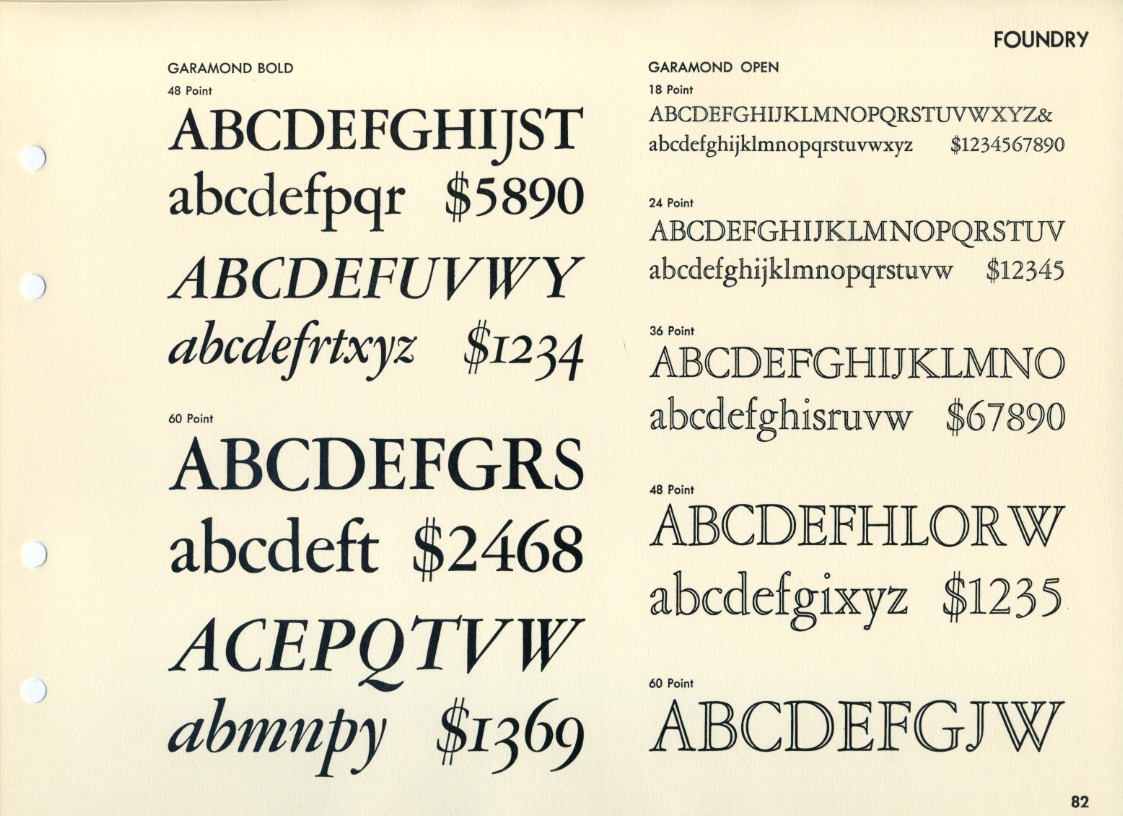
    American Type Founders 1923 Garamond specimen page
    An American Type Founders specimen page from 1923, showing Garamond Bold and Garamond Open (public domain, via Wikimedia Commons)

    The Design: The Old-Style Ideal

    What makes an old-style serif

    Garamond is the textbook specimen of the old-style class, and every one of its traits is functional Renaissance logic rather than decoration:

    • Slanted stress. The thick and thin parts of each letter follow the angle of a broad-nib pen held in the hand, not the vertical axis of later “modern” faces.
    • Modest contrast. Thick and thin strokes differ, but gently — no hairlines to break up on rough paper.
    • Bracketed serifs. The serifs flow into the stem with a curved shoulder, softening the junction.
    • A small x-height relative to cap height. Garamond’s lowercase is famously compact under its capitals, with long, elegant ascenders and descenders. This gives pages their airy, humanistic texture — and, like Futura, dictates how the face must be sized.
    • Old-style numerals. The default figures are “text figures,” with heights and descenders like lowercase letters (3 and 5 descending, 6 and 8 ascending), blending beautifully into running text.

    The paragraph is the unit of design

    The deepest compliment paid to Garamond is that it is designed at the paragraph level. Every individual letter is pleasant; more importantly, thousands of them together produce an even, restful “color” on the page that lets you read for hours. This is why Garamond remained the default answer to “what should a literary book be set in?” long after flashier faces came and went. Its italic, cut in the chancery tradition, is one of the loveliest in any serif family, and pairs with the roman without a jolt.

    Garamond in the Wild

    Garamond’s reach is enormous, if quieter than Helvetica’s. Publishing house after publishing house has standardized its fiction and humanities lists on some form of it. In the corporate world, the most famous adoption was Apple: from 1984 into the 1990s, Apple’s marketing, manuals and packaging were set in a customized version called Apple Garamond, giving the young company a bookish, humanist voice that contrasted sharply with the corporate sans-serifs of its competitors.

    You will also find it (or its close cousins) across the fashion and luxury world, in fine stationery, in US government documents — where a tradition holds that many agencies prefer it for its compactness — and, everywhere, in the world’s favorite free revival. The design’s authority is cumulative: it has simply been the voice of serious, beautiful text for so long that not using it feels like a decision in itself.

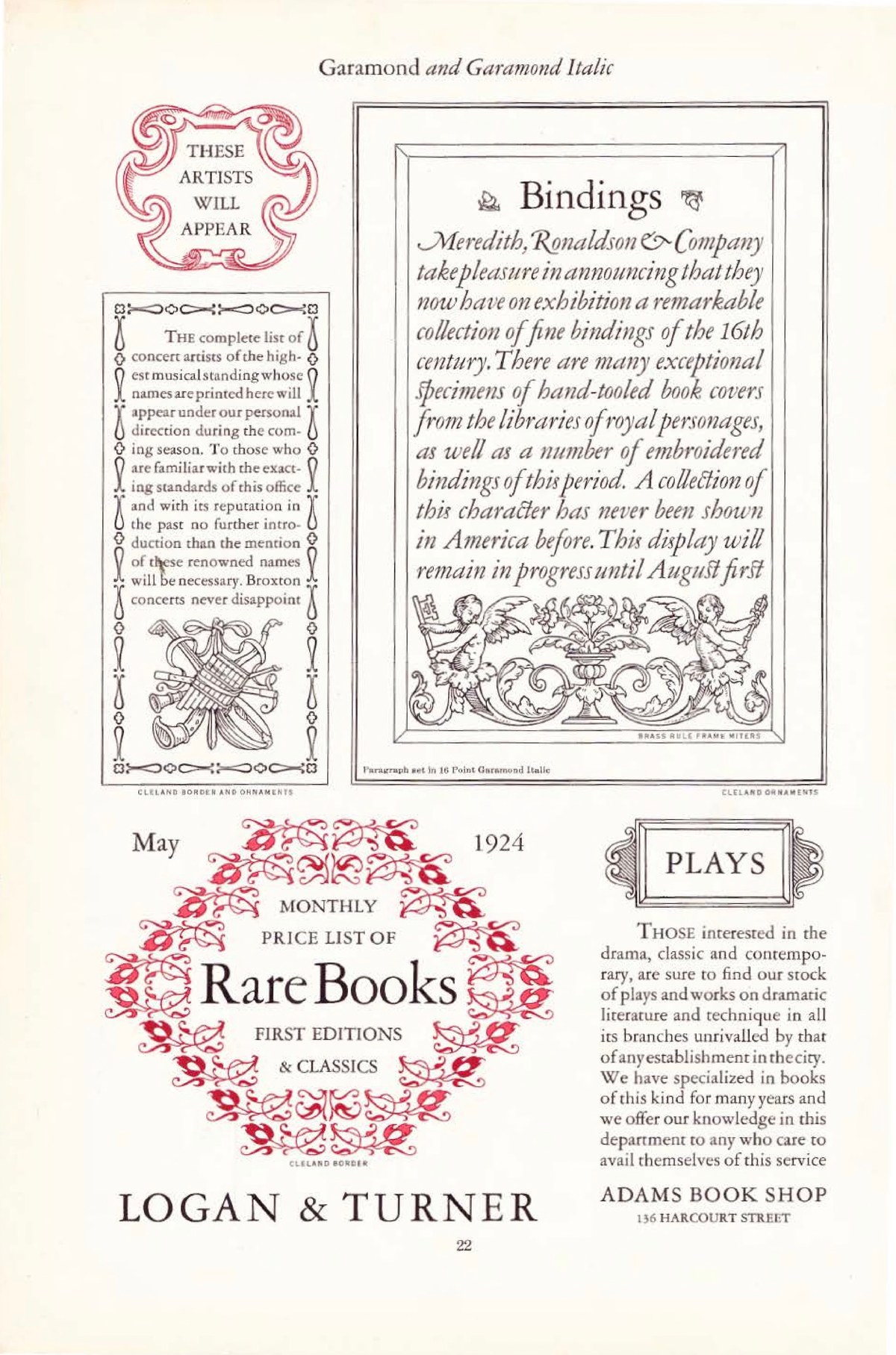
    Vintage magazine-style specimen page set in Garamond and Garamond Italic
    A 1920s magazine-style page set entirely in Garamond and Garamond Italic. Photo: James Puckett, CC BY 2.0, via Wikimedia Commons

    The Weak Spots

    It is small on the screen. That small x-height, so elegant on paper, works against Garamond in digital environments. Because the lowercase is compact, a 16px Garamond looks like a 13px Helvetica; web designers who use it without adjusting size produce text that visitors strain to read. Its delicate thin strokes also suffer on low-resolution displays.

    The name is a minefield. As covered above, “Garamond” describes a genre, and the versions disagree about weight, width and even basic letterforms. ATF’s revival is comparatively heavy and (in its italic) opinionated; Monotype’s is robust for text; Stempel’s is closer to Jannon; Adobe Garamond leans on Garamont’s authentic punches; ITC Garamond, popular in the 1970s, stretches the lowercase so aggressively that purists winced. Two books set in “Garamond” can look like different typefaces.

    It does not want to be loud. Garamond has little display vocabulary in most revivals — no heavy poster weights, no condensed cuts. Ask it to shout in a headline and it sounds like a librarian raising their voice: technically possible, slightly wrong.

    Practical Tips for Using Garamond

    1. Start with the free one. EB Garamond, hosted on Google Fonts, is a scholarly revival based on Garamont’s authentic Egenolff–Berner specimens. It is comprehensive (including Greek and Cyrillic), variable, and genuinely excellent — the default choice for most projects.

    2. For print books, consider Monotype or Adobe. Monotype Garamond’s sturdier color survives long print runs; Adobe Garamond Pro offers a complete professional package with small caps, old-style figures by default and thoughtful OpenType features.

    3. Size it up. On screens, set Garamond two to three points (or several pixels) larger than you would set Helvetica or Inter.

    4. Use the numerals deliberately. Old-style figures are gorgeous in prose and wrong in spreadsheets and prices; switch to lining figures where the context is data.

    5. Pair with a quiet sans. For labels and interface elements, a neutral geometric or grotesque sans (or a slightly warm one like Source Sans) complements Garamond without competing with its italics.

    The Alternatives

    • Sabon (Jan Tschichold, 1964) — the minimalist’s Garamond: a strict, unified design named for Garamont’s son-in-law, famous for being the first face released identically for hand, machine and photocomposition.
    • Caslon — the English old-style answer: slightly larger, sturdier, with more color variation; historically the other great “book face.”
    • Bembo / Poliphilus — the Venetian branch of the same tradition, warmer and more archaic.
    • Granjon — Garamont’s Parisian contemporary, revived in a lovely, slightly sturdier form.
    • Jannon (the real thing, sort of) — revived directly as “Jannon” in modern digitizations, closing the circle of the historical mix-up.

    Verdict

    Garamond is typography’s proof that a design can be simultaneously five hundred years old and fully contemporary. Its letterforms encode the logic of the hand and the priorities of the Renaissance book, and every generation of revivals has found new work for them — from 1920s type foundries to Apple’s 1984 launch materials to today’s free variable fonts. Its weaknesses are specific and avoidable: size it generously, choose your revival knowingly, and keep it away from spreadsheets.

    For long-form text — novels, essays, poetry, anything that rewards patience — Garamond remains the measure all other text faces are judged by. It is not neutral, like Helvetica; it is courteous. That is a rarer quality, and it ages better.

    Rating: 9/10 — the classic book serif, still unmatched for quiet, humane reading; just verify which Garamond you mean.

  • Helvetica: The Neutral Typeface That Took Over the World

    Helvetica: The Neutral Typeface That Took Over the World

    If a single typeface could be photographed holding a passport, Helvetica would have the most stamps of any font alive. It is on the New York City subway, on Lufthansa jets, on government forms, on the logos of dozens of the world’s largest companies, and in the permanent collection of MoMA. It is also — this is the strange part — a typeface many people cannot name on sight, because Helvetica’s defining ambition is to be invisible. Designed in Switzerland in 1957 as a tool, not an artwork, it became the most used, most copied, most parodied and most debated sans-serif of the twentieth century. This review looks at where it came from, why designers either love it or are bored to tears by it, and what you should know before using it today.

    Origins: A Sales Director’s Brief

    Helvetica was born at the Haas Type Foundry in Münchenstein, a small Swiss town near Basel. In 1956, the foundry’s managing director Eduard Hoffmann made a pragmatic decision: the booming Swiss advertising market was buying modern sans-serifs, and Haas — whose parent relationship gave it ties to the classic nineteenth-century grotesque Akzidenz-Grotesk — wanted a clean, modern competitor of its own. He handed the task to Max Miedinger, a seasoned typeface designer and sales representative at the foundry.

    Miedinger redrew the old grotesque with cleaner, more even forms and a larger x-height. The result was released in 1957 under the sober name Neue Haas Grotesk — and it sold well. But the face became a phenomenon only after 1960, when the German parent foundry D. Stempel AG renamed it “Helvetica,” Latin for “the Swiss,” to market it internationally. The rebranding was a masterstroke: a neutral name for a neutral face, implying not a personality but a standard, like stainless steel or the metric system.

    Switzerland in the 1950s was the epicenter of the “Swiss Style” of graphic design — a movement that preached objectivity, grids, asymmetry and the removal of the designer’s ego. Helvetica was that philosophy cast in metal. It did not illustrate; it informed.

    The Design: Engineered Neutrality

    What “neutral” actually means

    Helvetica’s neutrality is not an absence of decisions; it is a dense set of them. The apertures — the openings of letters like c, e, s and a — are deliberately closed, giving each glyph a self-contained, rectangular solidity. The terminals of curves are cut strictly horizontally or vertically, so the letterforms align with an invisible grid. The strokes are near-monolinear, the spacing is tight and even, and the x-height is generous without being extreme. Nothing points, nothing swells, nothing performs.

    The result is a typeface that imposes almost no mood of its own — which is exactly why it could carry any mood a client wanted. A bank could look trustworthy, an airline could look modern, a government could look authoritative, all in the same letterforms.

    The family grew into a system

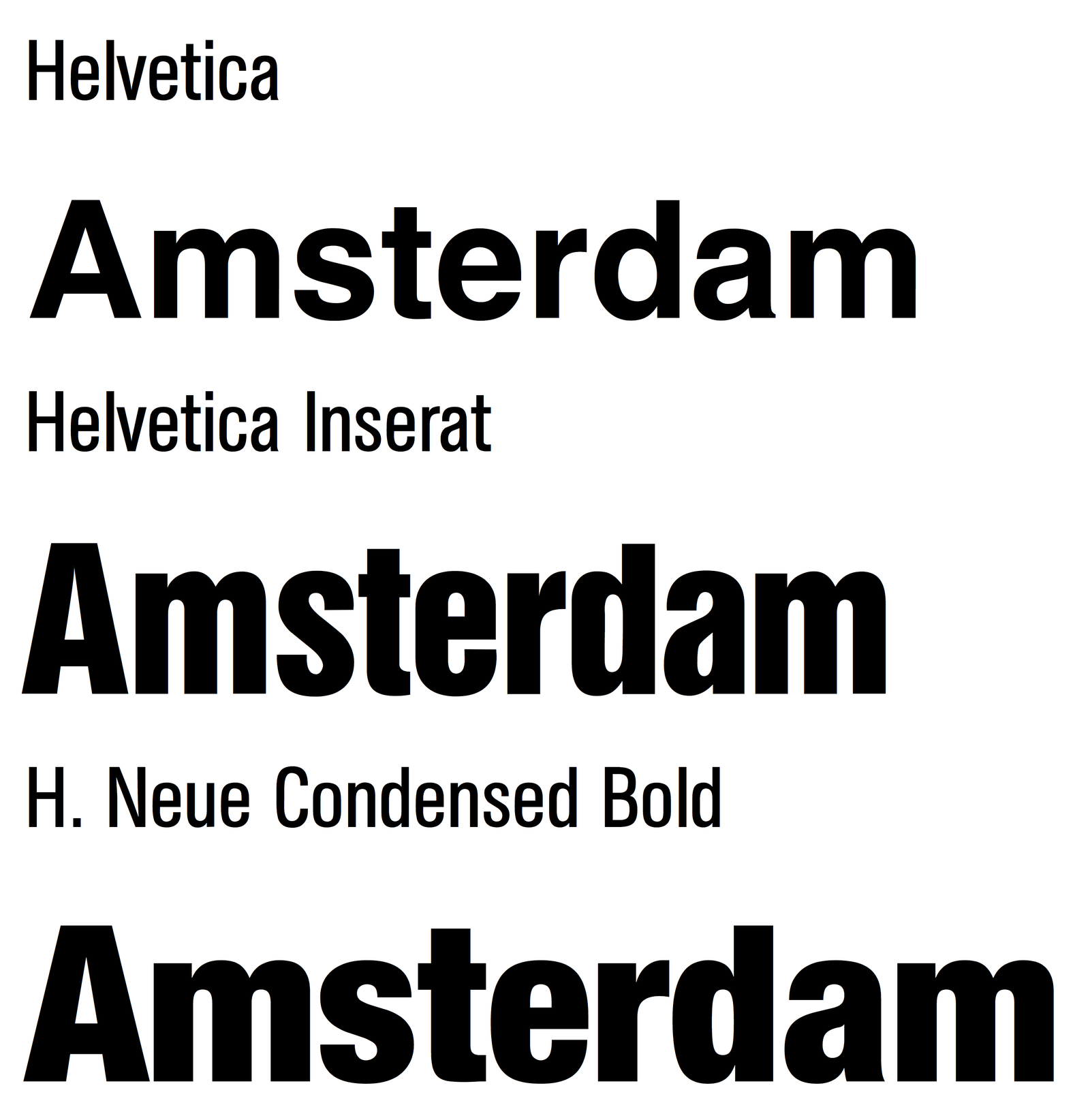
    The original family expanded steadily: Light, Medium, Bold, Black, plus condensed and extended companions, and eventually a Neue Helvetica reworking with a unified weight system, and Helvetica Now, a modern reinterpretation with optical sizes for text, display and micro settings. The breadth of the family is one of Helvetica’s genuine superpowers — it is less a typeface than an infrastructure.

    Type specimen comparing Helvetica, Helvetica Inserat and Helvetica Neue Condensed Bold
    Helvetica beside its condensed companions. Image by Blythwood, CC BY-SA 4.0, via Wikimedia Commons

    Helvetica in the Wild

    The 1960s and 1970s made Helvetica the visual voice of corporate modernity. American Airlines, Lufthansa, Nestlé, BMW, Toshiba, American Apparel, Crate & Barrel, The North Face, Tupperware — a staggering share of postwar brand identities were set in it. The New York City subway’s signage system, directed by designers Massimo Vignelli and Bob Noorda, brought Helvetica (after early use of a related face) into the daily lives of millions of commuters. NASA’s technical documentation and Space Shuttle interfaces leaned on it; when you picture “official document,” there is a good chance your brain is rendering it in Helvetica.

    Its cultural footprint grew beyond design. In 2007, Gary Hustwit’s documentary Helvetica turned a font into a cinema subject, and “Helvetica cola” satires and counterculture parodies followed — the typeface had become a symbol of Establishment neutrality, loved and resented in equal measure.

    Yet the deepest reason for its dominance is boring and practical: Helvetica simply works everywhere. It sets dense text without fuzz, survives photocopying, engraving, embroidery, screen printing and low-resolution signage, and it licenses across every platform. Like concrete and corrugated steel, it is a material before it is a style.

    The Weak Spots

    Ubiquity became its burden. A typeface designed to carry no personality ends up broadcasting one anyway: the personality of the corporation. By the 1980s a creative backlash was inevitable, and it has never fully subsided. Choosing Helvetica today is a statement — just not the one it used to be.

    Small-size reading is a known weakness. The closed apertures that give Helvetica its solidity cause neighboring letters to visually interfere at text sizes; critics have long noted that words like “clean” or “roar” can mush together. Typeface designers studying letter recognition have shown that more open apertures read more quickly. Helvetica was tuned for display and signage first, reading comfort second.

    Version confusion is real. “Helvetica” on your computer might be the 1957 metal design, the 1983 Neue Helvetica, the 2014 Neue Haas Grotesk revival, or — on many Windows machines — nothing at all, with Arial silently substituting. Licensing a proper version costs real money, and the differences are not cosmetic: the spacing and stroke tuning vary considerably.

    It has no italic in the true sense. Helvetica’s “italic” is an oblique — the roman slanted, with calligraphic qualities absent. For editorial or expressive work, that is a real limitation.

    Comparison of official Helvetica versions and free clones
    Official Helvetica versions versus its many clones. Image by Thunderbird2013, CC BY 4.0, via Wikimedia Commons

    Practical Tips for Using Helvetica

    1. Buy the right one. If the project justifies Helvetica, it justifies Neue Haas Grotesk (the faithful 2010s revival by Christian Schwartz, available via Adobe Fonts) or Helvetica Now for modern UI work. The old bundled Neue Helvetica versions have inconsistent spacing by today’s standards.

    2. On a budget, use a free clone. TeX Gyre Heros, Nimbus Sans and Arimo are legal, metric-similar free alternatives. None is a scandal; each is a pragmatic stand-in.

    3. Tighten your tracking for display. Helvetica benefits from slightly negative letterspacing at large sizes; leave it loose and headlines feel 1980s-corporate rather than crisp.

    4. Avoid tiny sizes for long reading. For UI body text at 12–14px, more open faces (Inter, Roboto, SF Pro) measurably outperform it.

    5. Pair it with texture. Against Helvetica’s neutrality, a characterful serif or an expressive display face creates productive tension; pairing it with another neutral sans produces the beige-on-beige effect.

    The Alternatives

    • Univers (Adrian Frutiger, 1957) — Helvetica’s great contemporary rival, released the same year. More rigorously systematized (the numbering system!) and generally considered the finer work of design. Frutiger’s later faces fixed the small-size problems entirely.
    • Arial — born as a metrically compatible substitute; after decades of sibling rivalry, most typographers still give the nod to Helvetica’s spacing and R, G and a.
    • Neue Haas Unica — a thoughtful 2014 synthesis of Helvetica and Univers.
    • Inter / Roboto / SF Pro — the screen-native descendants that solved Helvetica’s small-size problems for interfaces.
    • Aktiv Grotesk, Acumin — modern corporate grotesques for those who want the flavor without the baggage.

    Verdict

    Judging Helvetica as a design is almost beside the point; it is less a typeface than a piece of twentieth-century infrastructure, the typographic equivalent of the shipping container — standardized, neutral, everywhere, and quietly revolutionary for exactly those reasons. Its flaws (tight apertures at text sizes, version chaos, creative overexposure) are real, but every one of them has a well-documented workaround, starting with the excellent Neue Haas Grotesk revival.

    Use it when you want authority without argument and style without era. Just know that in 2026, choosing Helvetica is no longer neutral — it is a retrospective.

    Rating: 9/10 — the most consequential typeface of the corporate age; read the fine print about which version you are actually buying.

  • Futura: The Geometric Typeface That Conquered the 20th Century

    Futura: The Geometric Typeface That Conquered the 20th Century

    Almost one hundred years after it was drawn, Futura still looks like a message from another era — an era that believed the future would be clean, rational and beautifully simple. It is on Supreme’s red box logo, in every Wes Anderson film title, on Volkswagen ads of the 1960s and, reportedly, on the plaque the Apollo 11 crew left on the Moon. Few typefaces can claim to have defined the visual language of an entire century. In this review, we look at how Futura came to be, why it looked so shockingly modern in 1927, where it still works today, and what you should know before using it in a digital project.

    A type-specimen proof of Futura Medium from a 20th-century type foundry (public domain, via Wikimedia Commons)
    A type-specimen proof of Futura Medium from a 20th-century type foundry (public domain, via Wikimedia Commons)

    Origins: A Type Designer Who Wasn’t a Type Designer

    Futura was created by Paul Renner, a German typographer, author and design theorist — notably, not a professional letter-cutting craftsman. In the mid-1920s, Renner was teaching in Munich amid the ferment of the Bauhaus movement, which preached that design should abandon ornament and embrace the pure forms of the machine age. Renner asked a radical question: what would letterforms look like if they were built from scratch on geometric principles — circles, triangles and straight lines — rather than inherited from centuries of handwriting and Renaissance calligraphy?

    His answer was published as drawings in 1927 and cut into metal by the Bauer Type Foundry in Frankfurt. The result caused an uproar in typographic circles precisely because it broke every rule the craft held sacred. Traditionalists saw an assault on readability and heritage. The modernists saw the first letterform of a new civilization. Both were partly right, which is exactly why the design matters.

    Even the naming was forward-looking: “Futura” — the future, in Latin and Italian — promised the world that typography, like architecture and industry, was about to be rebuilt. A promotional slogan of the era described the search for “the typeface of our time,” and Futura became the closest thing typography had to a manifesto you could set at 12 point.

    The Design: Geometry With Consequences

    Pure geometry, then compromise

    Futura’s lowercase is its calling card. The o is a near-perfect circle, the e almost a circle with a horizontal bar, the a a simple circle with a stem (the “single-story” a of a schoolroom primer). Stroke weight is close to monolinear, and sharp triangular tapers on letters like m and n — a concession to optical balance Renner himself argued over with the foundry’s punchcutters — keep the geometry from feeling dead. These pointed junctions are one of Futura’s most distinctive and loved details: geometry softened just enough to feel alive.

    The unusual proportions

    Here is the detail that separates Futura from nearly every modern geometric sans: its very small x-height. Lowercase letters are tiny in proportion to capitals, with dramatically long ascenders and descenders. Set a line of Futura next to Inter or Helvetica and the difference is instantly visible — Futura’s caps tower over its lowercase like a tall man walking a small dog.

    This proportion is why Futura at display sizes looks effortlessly elegant, all legs and air, and why it becomes genuinely difficult to read below about 14 points. Small text needs a big x-height; Futura deliberately rejects it. It is a typeface that would rather be beautiful at 48 points than practical at 10 — a trade almost no contemporary UI typeface would dare make.

    One look, many voices

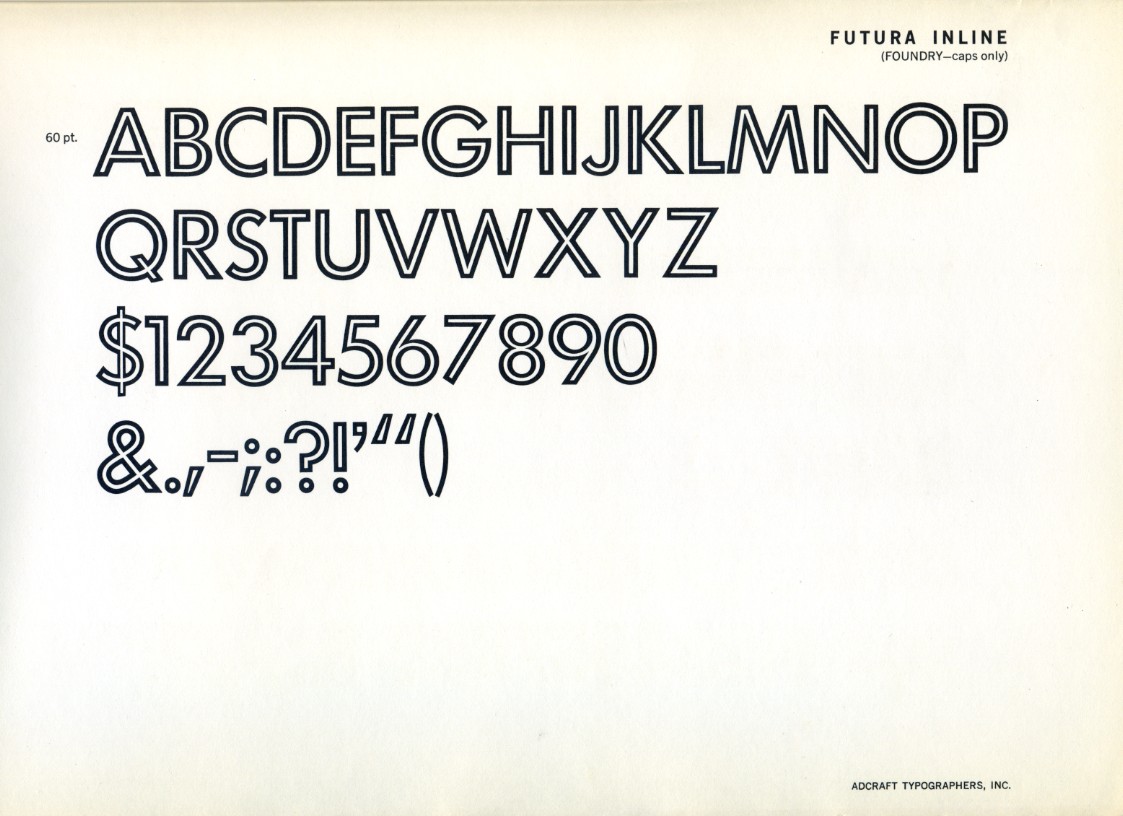
    The original family was comparatively restrained, but over the following decades Bauer expanded it into a long-running system: Light, Book, Medium, Bold, Heavy, plus condensed, extended and decorative display cuts. Futura Display, with its exaggerated geometry, and Futura Inline, with its double-struck outlines, showed that the underlying idea could be dressed up as well as stripped down.

    A specimen of Futura Inline, one of the decorative display cuts. Photo: James Puckett, CC BY 2.0, via Wikimedia Commons
    A specimen of Futura Inline, one of the decorative display cuts. Photo: James Puckett, CC BY 2.0, via Wikimedia Commons

    Futura in the Wild

    The 20th century adopted Futura as its unofficial voice. The famous 1960s Volkswagen “Think Small” and “Lemon” advertisements — often called the best advertising campaign ever run — were set in Futura. Absolut Vodka built four decades of print advertising on it. IKEA used it as its corporate typeface until 2010. Calvin Klein, Supreme, Nike’s classic campaigns, Louis Vuitton’s modern-era monogram era branding, Wes Anderson’s title sequences from The Royal Tenenbaums onward — the list barely ends.

    The typeface’s association with modernity was so strong that it even entered politics and space. Futura’s clean geometry fitted the aesthetic of both the German avant-garde (and, complicatedly, drew attacks from the Nazi cultural establishment — Renner himself was briefly arrested in 1933 for opposing the regime) and, decades later, NASA-era futurism, when the commemorative plaque left on the lunar surface in 1969 carried its capitals into history.

    What explains this reach? Futura is one of very few typefaces that can look simultaneously premium and democratic. Its geometry reads as intelligent, honest and forward-looking; its simplicity survives photocopying, silkscreening, signage and television. That combination made it the default ambition of branding for half a century.

    The Weak Spots

    Small sizes are not its territory. As covered above, the tiny x-height limits body-text duty. Long paragraphs in Futura feel airless and tiring; even its defenders use it mainly for headlines, packaging and logos.

    The digital landscape is a minefield. The original foundry’s version was drawn for metal, and countless unauthorized or half-hearted digitalizations circulate — some with the pointed joins sanded off, others with spacing that collapses at display sizes. For years, “Futura” in a font menu could mean anything. The situation is better now, but you still need to choose your version carefully.

    It has been copied to death. Century Gothic, Avenir, Avant Garde Gothic, Jost and dozens of free geometric sans-serifs all descend from or compete with Futura’s idea. That ubiquity blunts its edge: in a startup pitch deck, geometric sans is the wallpaper of the era, not a statement.

    Personality is severe, not warm. Futura’s circles are colder than Avenir’s humanist warmth or Circular’s friendliness. For hospitality, food or community brands, that severity can read as aloof.

    Practical Tips for Using Futura

    1. Use a high-quality revival. Futura ND by Neufville Digital was produced with a documented connection to Renner’s own notes; URW’s and Bauer’s official versions are solid too. Avoid no-name knockoffs with rounded joins.

    2. Keep it large. Treat Futura as a display face: headlines, titles, packaging, logotypes. Pair it with a hardworking text face for body copy — a humanist serif or a generous x-height sans will do.

    3. Watch the spacing at small sizes. Metal Futura was spaced optically; some digital cuts inherit awkward gaps between pointy letters. Kern m, n, v and w junctions if your layout is sensitive.

    4. On a budget, try Jost. This free Google Fonts family is an open-source interpretation of Renner’s geometric ideal — not a clone, but honest about its inspiration and usable for real projects.

    5. Lean into caps for drama. Futura’s capitals are the most famous part of the design. All-caps settings with wide letterspacing are where it is at its most iconic — just check your tracking, because geometry punishes sloppy spacing more than calligraphic faces do.

    The Alternatives

    • Avenir (Frutiger, 1988) — the humanist’s answer to Futura: same geometric skeleton, gentler proportions, far better at text sizes. The first choice if you love the look but need readability.
    • Century Gothic (1930s/1990s) — wider, rounder, very popular in American schools; a useful cheap stand-in with a friendlier feel.
    • Jost (free) — the best open-source route to the Futura idea, straight from Google Fonts.
    • Avant Garde Gothic — the 1960s American reinterpretation, more display-oriented and tighter.
    • Renner\* and Spartan — further open-source experiments in the same lineage.

    Verdict

    Futura is that rare thing: a typeface that changed what people believed type could be, and then stayed relevant long enough to become a classic of two different centuries. Its geometry is uncompromising, its history is dramatic, and its best digital revivals are genuinely excellent. Its weaknesses — the tiny x-height, the crowded field of imitators — are real but easy to plan around.

    If you need warmth and readability in running text, look elsewhere. But for a headline, a logo or a title card that should feel confident, rational and quietly futuristic, Futura remains nearly unbeatable a century on. The future it promised never quite arrived — but it still looks good written in Futura.

    Rating: 9/10 — a century-defining classic; just keep it away from your body text.

  • Inter: The Typeface Built for Screens — A Complete Review

    Inter: The Typeface Built for Screens — A Complete Review

    Some fonts arrive quietly and end up everywhere. Inter is one of them. If you have filed an issue on GitHub, resized a frame in Figma, or browsed the Rust or Wikipedia sister projects, you have already been staring at it for hours — probably without noticing. That invisibility is precisely the point. Inter was designed to disappear into the interface, to make buttons, labels and code snippets legible at sizes most typefaces struggle with. In this review, we look at where Inter came from, what makes it tick, where it falls short, and whether it deserves a place in your next project.

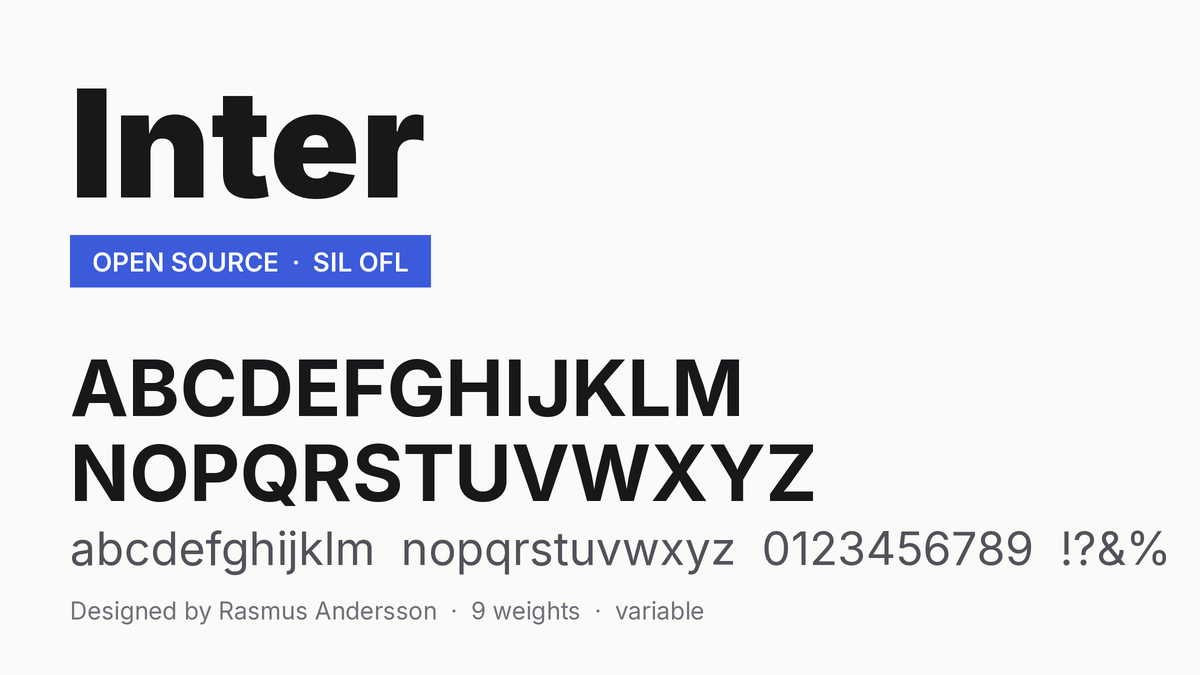
    Inter typeface specimen — full alphabet, numerals and nine weights
    Inter: full alphabet, numerals and nine weights under the SIL Open Font License

    Origins: One Engineer’s Side Project

    Inter is the brainchild of Rasmus Andersson, a Swedish software engineer who spent years building products at Spotify and PayPal. The project began in 2016 under its original name, Interface — a name that said exactly what it was for. Andersson was not a career type designer; he was a working developer frustrated by the typefaces available for UI work. System fonts were licensed and inconsistent across platforms. Helvetica was designed in 1957, long before a single pixel grid existed, and it shows in its tight spacing at small sizes. Open-source alternatives were either too quirky or too generic.

    So he did what many great side projects start with: he scratched his own itch. Andersson studied the letterforms of classic neo-grotesques — Helvetica, Univers, Akzidenz-Grotesk — and rebuilt their spirit for the modern screen, with generous spacing, a tall x-height, and the kind of precision that a former engineer brings to any problem. Inter was renamed and refined over several years of public development, with feedback from type designers and the developer community shaping release after release. Today it is free, open source, and distributed under the SIL Open Font License, which means you can use it in anything — commercial or personal — without paying a cent or asking permission.

    What Makes Inter Different

    It was drawn for pixels, not paper

    The single biggest difference between Inter and the classics it borrows from is intent. Helvetica was optimized for metal and print. Inter was optimized for 14 pixels on a retina display. That shows up in concrete ways:

    • A very large x-height. Lowercase letters occupy more of the em, so text reads as bigger and clearer at the same font size. At 11–14px, this is the difference between comfortable and squinty.
    • Open apertures. The counters (the openings in letters like c, e and s) are wider, which keeps letterforms from clogging when anti-aliasing blurs them.
    • Wide spacing. Inter ships slightly looser than print-oriented faces by default, and the spacing holds up at tiny sizes.

    Disambiguation is a feature, not an afterthought

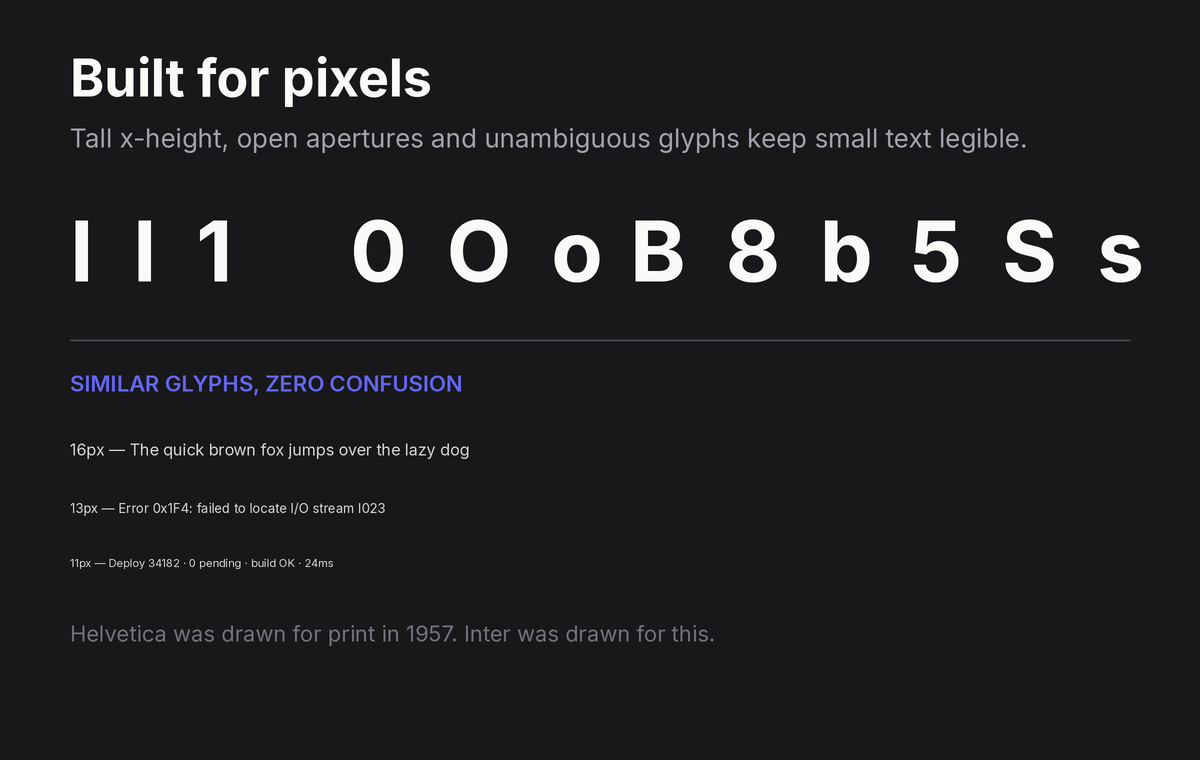
    In a user interface, confusing one glyph for another is a bug. Inter treats it that way. The capital I, lowercase l and numeral 1 are clearly differentiated. The zero can be rendered with a slash or a dot through it — a blessing for anyone displaying codes, hashes or identifiers. Tabs and dropdowns full of look-alike characters are simply safer in Inter.

    Inter glyph disambiguation and small-size legibility samples
    Inter stays legible at small sizes, with distinct look-alike glyphs

    Customization that respects the engineer’s mindset

    Inter is available as a variable font with a weight axis running from Thin (100) to Black (900), plus an optical-size axis in recent versions. Beyond weight, it ships with a deep set of OpenType stylistic sets and character variants that let you tune it like software:

    • Alternate single-story `a` and `g` for a friendlier look
    • Disambiguation options for characters like `i`, `j`, `l` and the numerals
    • Contextual alternates and optional ligatures
    • A rich set of arrows and box-drawing characters that make it a popular companion to coding fonts

    Andersson also maintains Inter Display, a companion cut with tighter spacing and other adjustments made for large sizes — headlines and titles — where the spacing that helps at 12px would look gappy at 60px. Knowing when to reach for Inter versus Inter Display is the kind of detail that separates a polished UI from a merely correct one.

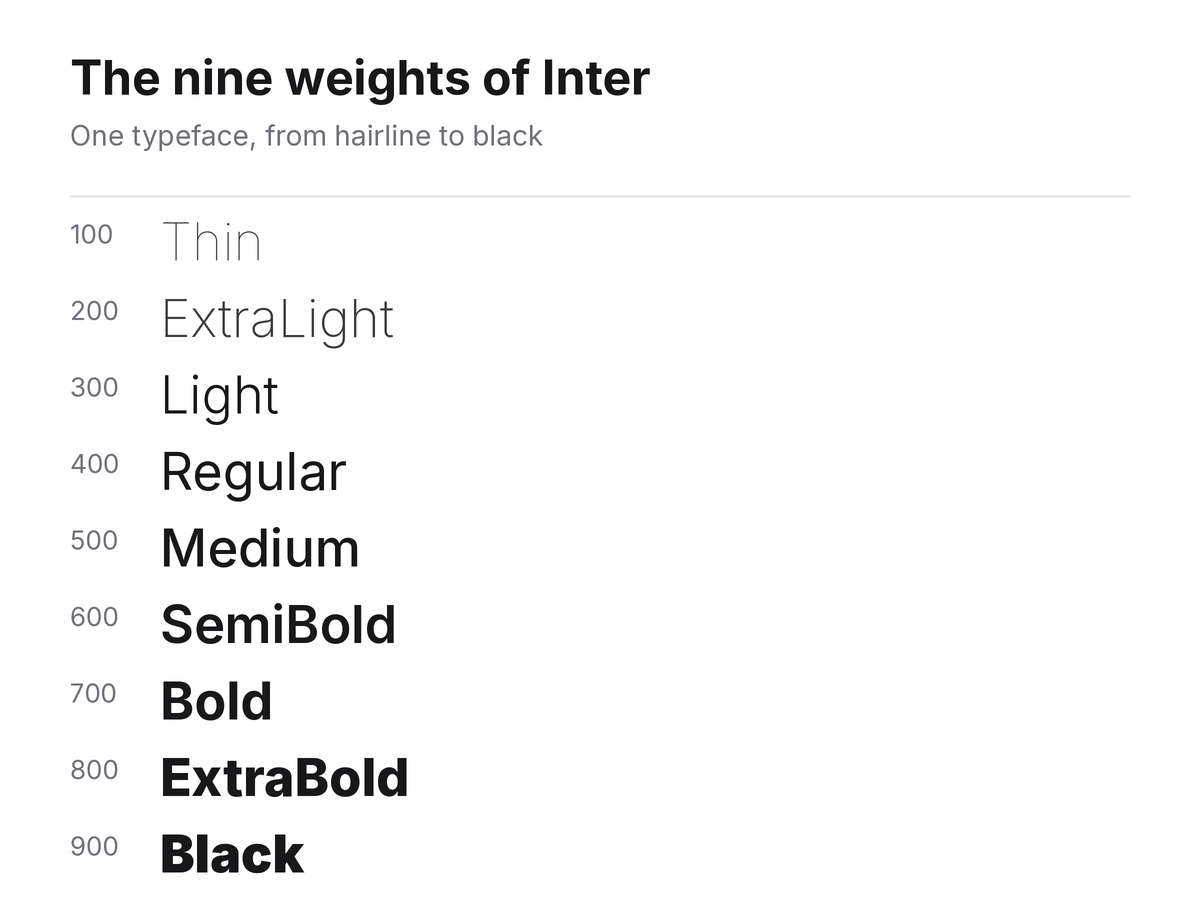
    The nine weights of Inter, from Thin 100 to Black 900
    The nine weights of Inter, from Thin 100 to Black 900

    Inter in the Wild

    You do not have to take the typeface’s word for it; the adoption speaks. GitHub migrated its interface to Inter. Figma, whose entire product is about text and layout, relies on it. Mozilla, the Rust project, countless design systems and an enormous share of modern SaaS dashboards use it as their workhorse typeface. In Google Fonts it consistently ranks among the most-served typefaces in the world.

    The reason is simple: Inter hits a rare combination. It is neutral enough to carry a corporate brand, technical enough for dense data interfaces, and free enough that no procurement conversation is needed. It has effectively become the default answer to “what sans should our app use?” — for better and, as we will see, for worse.

    The Weak Spots

    No review is honest without criticism, and Inter has real limitations.

    It has become generic. When every product uses the same typeface, none of them looks distinct. If your brand needs a voice, Inter will not give you one — it will give you clarity. That is a fair trade for a dashboard, and a poor one for a fashion label or an editorial site.

    Print is not its home turf. The generous spacing and tall x-height that make it shine on screens make it look airy and slightly loose in long-form print. Inter Display helps at large sizes, but for body copy on paper, faces designed for print still win.

    The family is lean. You get a comprehensive weight range and an italic (added in later releases after years of community pressure), but you will not find the display widths, condensed cuts or expressive alternates that broader superfamilies offer. Inter does one job superbly, not many jobs adequately.

    Familiarity can read as blandness. Some critics note Inter’s proximity to SF Pro, Roboto and Helvetica. It borrows deliberately from all three, and its lineage is part of its appeal — but if you want something that stops a scroll, this is not it.

    Practical Tips for Using Inter

    If you do bring Inter into a project, a few settings will get the most out of it:

    1. Mind the size. Inter runs large; body text at 15–16px in Inter often looks like 17–18px in Helvetica. Adjust your scale accordingly rather than switching blindly.

    2. Use Inter Display for headings. Below roughly 14px, regular Inter; above roughly 20px, Inter Display. The difference is subtle but real.

    3. Turn on the features you need. Tabular numbers (`tnum`) for tables, slashed zero (`zero`) for technical content, case-sensitive punctuation (`case`) for all-caps labels. Inter gives you these for free — most system fonts do not.

    4. Pair it with contrast. Inter pairs beautifully with humanist serifs (Source Serif, Lora) for long-form reading, or with a mono like JetBrains Mono for technical documentation.

    5. Self-host the variable font. A single variable font file covers every weight you will ever need, usually at a smaller total cost than loading three or four static weights.

    The Alternatives

    How does Inter stack up against its closest rivals?

    • SF Pro — Apple’s system face. Gorgeous on Apple hardware, unavailable for general licensing elsewhere.
    • Roboto — Google’s workhorse. Excellent, but more mechanically geometric and less finely tuned for small UI text than Inter.
    • IBM Plex Sans — far more personality and a great engineering story, but its quirks make it a brand statement rather than a neutral default.
    • Public Sans — the US government’s fork of Libre Franklin. A serious, free alternative with an institutional flavor.
    • Figtree, Manrope, Plus Jakarta Sans — newer open-source faces with friendlier geometry, popular when Inter feels too plain.

    None of them dethrones Inter at its own game: maximum legibility with minimum fuss.

    Verdict

    Inter is the rare typeface that fully delivers on its own mission statement. It set out to be the best possible typeface for computer interfaces, and within that narrow, ambitious goal, it may be the most successful open-source typeface ever made. Its x-height, disambiguation and OpenType tooling are best in class; its license and variable-font packaging remove every practical barrier to adoption.

    Whether you should use it depends on the question Inter is bad at answering: what does your brand sound like? For documentation, developer tools, data-heavy products and anything where reading speed matters more than personality, the answer is easy — use Inter. For anything that needs to be remembered as much as read, treat it as your starting point, not your finish line.

    Rating: 9/10 — the default for a reason, and never once the wrong choice, but by design it is never the most memorable one either.