Some fonts arrive quietly and end up everywhere. Inter is one of them. If you have filed an issue on GitHub, resized a frame in Figma, or browsed the Rust or Wikipedia sister projects, you have already been staring at it for hours — probably without noticing. That invisibility is precisely the point. Inter was designed to disappear into the interface, to make buttons, labels and code snippets legible at sizes most typefaces struggle with. In this review, we look at where Inter came from, what makes it tick, where it falls short, and whether it deserves a place in your next project.
Origins: One Engineer’s Side Project
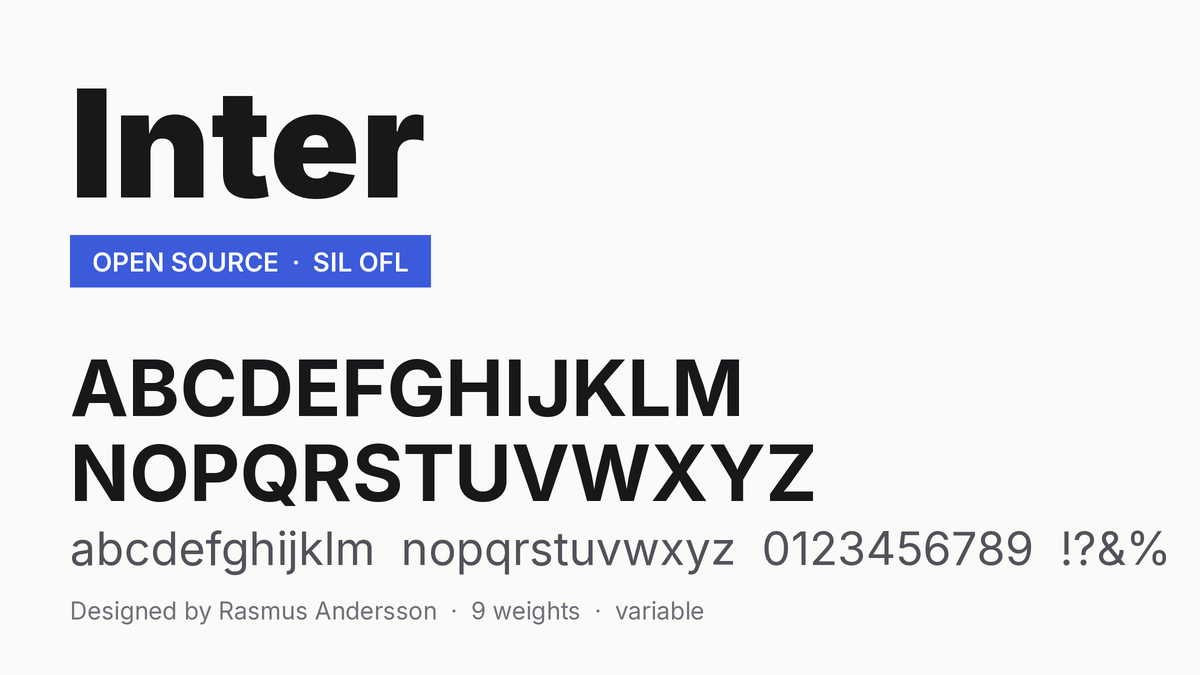
Inter is the brainchild of Rasmus Andersson, a Swedish software engineer who spent years building products at Spotify and PayPal. The project began in 2016 under its original name, Interface — a name that said exactly what it was for. Andersson was not a career type designer; he was a working developer frustrated by the typefaces available for UI work. System fonts were licensed and inconsistent across platforms. Helvetica was designed in 1957, long before a single pixel grid existed, and it shows in its tight spacing at small sizes. Open-source alternatives were either too quirky or too generic.
So he did what many great side projects start with: he scratched his own itch. Andersson studied the letterforms of classic neo-grotesques — Helvetica, Univers, Akzidenz-Grotesk — and rebuilt their spirit for the modern screen, with generous spacing, a tall x-height, and the kind of precision that a former engineer brings to any problem. Inter was renamed and refined over several years of public development, with feedback from type designers and the developer community shaping release after release. Today it is free, open source, and distributed under the SIL Open Font License, which means you can use it in anything — commercial or personal — without paying a cent or asking permission.
What Makes Inter Different
It was drawn for pixels, not paper
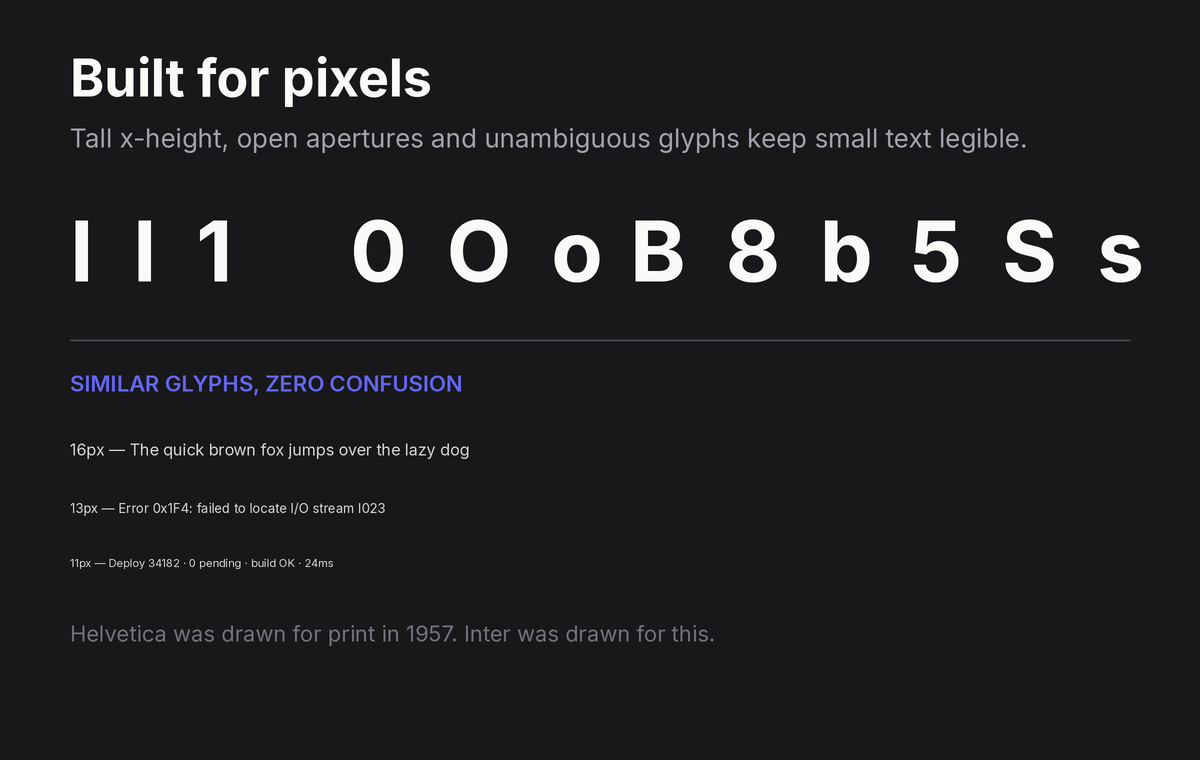
The single biggest difference between Inter and the classics it borrows from is intent. Helvetica was optimized for metal and print. Inter was optimized for 14 pixels on a retina display. That shows up in concrete ways:
- A very large x-height. Lowercase letters occupy more of the em, so text reads as bigger and clearer at the same font size. At 11–14px, this is the difference between comfortable and squinty.
- Open apertures. The counters (the openings in letters like c, e and s) are wider, which keeps letterforms from clogging when anti-aliasing blurs them.
- Wide spacing. Inter ships slightly looser than print-oriented faces by default, and the spacing holds up at tiny sizes.
Disambiguation is a feature, not an afterthought
In a user interface, confusing one glyph for another is a bug. Inter treats it that way. The capital I, lowercase l and numeral 1 are clearly differentiated. The zero can be rendered with a slash or a dot through it — a blessing for anyone displaying codes, hashes or identifiers. Tabs and dropdowns full of look-alike characters are simply safer in Inter.
Customization that respects the engineer’s mindset
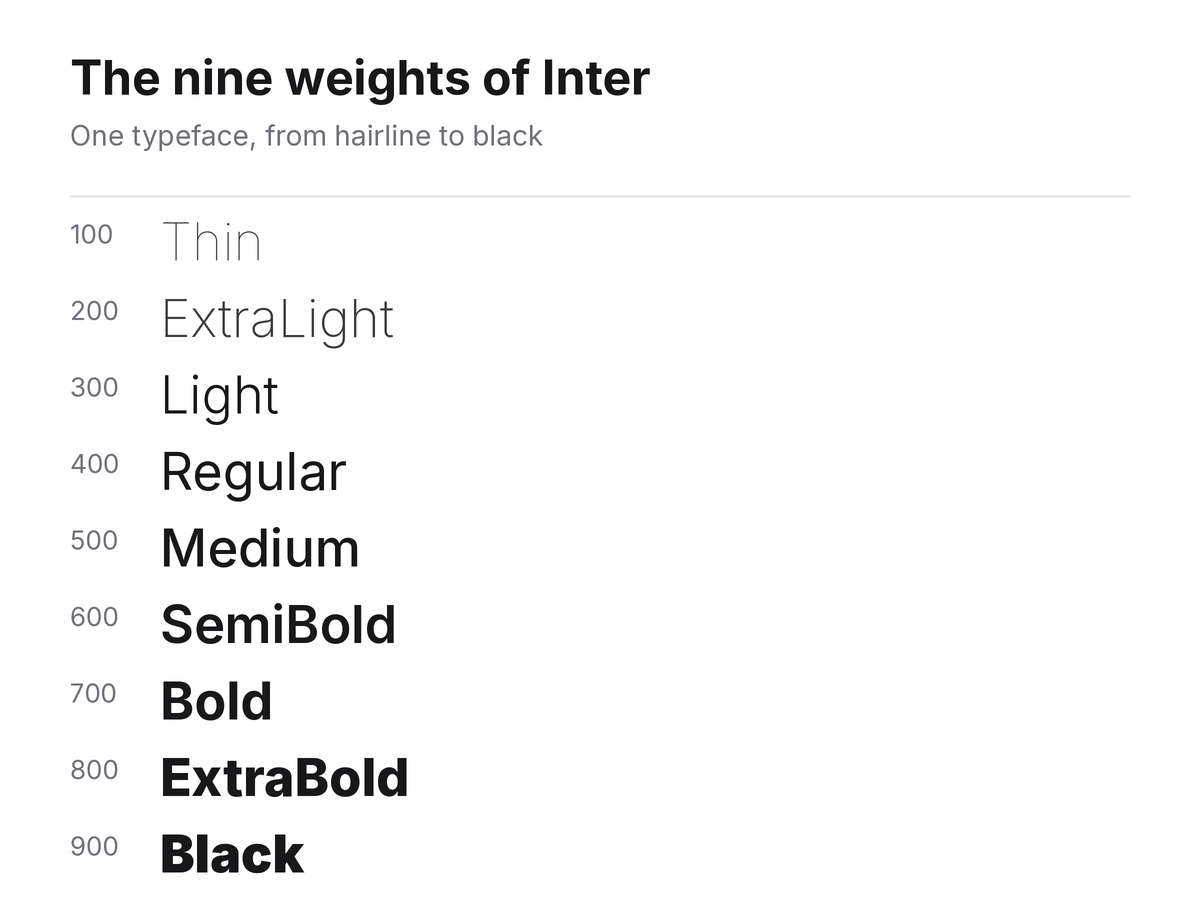
Inter is available as a variable font with a weight axis running from Thin (100) to Black (900), plus an optical-size axis in recent versions. Beyond weight, it ships with a deep set of OpenType stylistic sets and character variants that let you tune it like software:
- Alternate single-story `a` and `g` for a friendlier look
- Disambiguation options for characters like `i`, `j`, `l` and the numerals
- Contextual alternates and optional ligatures
- A rich set of arrows and box-drawing characters that make it a popular companion to coding fonts
Andersson also maintains Inter Display, a companion cut with tighter spacing and other adjustments made for large sizes — headlines and titles — where the spacing that helps at 12px would look gappy at 60px. Knowing when to reach for Inter versus Inter Display is the kind of detail that separates a polished UI from a merely correct one.
Inter in the Wild
You do not have to take the typeface’s word for it; the adoption speaks. GitHub migrated its interface to Inter. Figma, whose entire product is about text and layout, relies on it. Mozilla, the Rust project, countless design systems and an enormous share of modern SaaS dashboards use it as their workhorse typeface. In Google Fonts it consistently ranks among the most-served typefaces in the world.
The reason is simple: Inter hits a rare combination. It is neutral enough to carry a corporate brand, technical enough for dense data interfaces, and free enough that no procurement conversation is needed. It has effectively become the default answer to “what sans should our app use?” — for better and, as we will see, for worse.
The Weak Spots
No review is honest without criticism, and Inter has real limitations.
It has become generic. When every product uses the same typeface, none of them looks distinct. If your brand needs a voice, Inter will not give you one — it will give you clarity. That is a fair trade for a dashboard, and a poor one for a fashion label or an editorial site.
Print is not its home turf. The generous spacing and tall x-height that make it shine on screens make it look airy and slightly loose in long-form print. Inter Display helps at large sizes, but for body copy on paper, faces designed for print still win.
The family is lean. You get a comprehensive weight range and an italic (added in later releases after years of community pressure), but you will not find the display widths, condensed cuts or expressive alternates that broader superfamilies offer. Inter does one job superbly, not many jobs adequately.
Familiarity can read as blandness. Some critics note Inter’s proximity to SF Pro, Roboto and Helvetica. It borrows deliberately from all three, and its lineage is part of its appeal — but if you want something that stops a scroll, this is not it.
Practical Tips for Using Inter
If you do bring Inter into a project, a few settings will get the most out of it:
1. Mind the size. Inter runs large; body text at 15–16px in Inter often looks like 17–18px in Helvetica. Adjust your scale accordingly rather than switching blindly.
2. Use Inter Display for headings. Below roughly 14px, regular Inter; above roughly 20px, Inter Display. The difference is subtle but real.
3. Turn on the features you need. Tabular numbers (`tnum`) for tables, slashed zero (`zero`) for technical content, case-sensitive punctuation (`case`) for all-caps labels. Inter gives you these for free — most system fonts do not.
4. Pair it with contrast. Inter pairs beautifully with humanist serifs (Source Serif, Lora) for long-form reading, or with a mono like JetBrains Mono for technical documentation.
5. Self-host the variable font. A single variable font file covers every weight you will ever need, usually at a smaller total cost than loading three or four static weights.
The Alternatives
How does Inter stack up against its closest rivals?
- SF Pro — Apple’s system face. Gorgeous on Apple hardware, unavailable for general licensing elsewhere.
- Roboto — Google’s workhorse. Excellent, but more mechanically geometric and less finely tuned for small UI text than Inter.
- IBM Plex Sans — far more personality and a great engineering story, but its quirks make it a brand statement rather than a neutral default.
- Public Sans — the US government’s fork of Libre Franklin. A serious, free alternative with an institutional flavor.
- Figtree, Manrope, Plus Jakarta Sans — newer open-source faces with friendlier geometry, popular when Inter feels too plain.
None of them dethrones Inter at its own game: maximum legibility with minimum fuss.
Verdict
Inter is the rare typeface that fully delivers on its own mission statement. It set out to be the best possible typeface for computer interfaces, and within that narrow, ambitious goal, it may be the most successful open-source typeface ever made. Its x-height, disambiguation and OpenType tooling are best in class; its license and variable-font packaging remove every practical barrier to adoption.
Whether you should use it depends on the question Inter is bad at answering: what does your brand sound like? For documentation, developer tools, data-heavy products and anything where reading speed matters more than personality, the answer is easy — use Inter. For anything that needs to be remembered as much as read, treat it as your starting point, not your finish line.
Rating: 9/10 — the default for a reason, and never once the wrong choice, but by design it is never the most memorable one either.